
NEC Electra Elite IPK II (no date) SMDR setup and CDR format
This page shows how to get call records out of the NEC Electra Elite IPK II (no date) into Advanced PBX Data Logger: the connection settings, the parser to select and the 9 fields the logger extracts for reports or a database. The settings apply to our logger; other call accounting software may expect a different configuration.
Quick facts
| Item | NEC Electra Elite IPK II (no date) |
|---|---|
| Interface | LAN. The PBX accepts a connection on TCP port 60010; the logger connects to the PBX IP address. |
| Port | 60010 |
| Parser to select | NEC Electra Elite IPK II (no date) |
| Fields extracted | 9 |
| Other NEC systems | NEC Electra Elite, Aspire, DS2000, XN120 SMDR formats |
Printing Out SMDR Using LAN Port
1. Ensure that the SMDR license is activated on your PBX.

2. Go to 10-12 "Network setup" and specify a static IP address. Our logger will connect to this address.
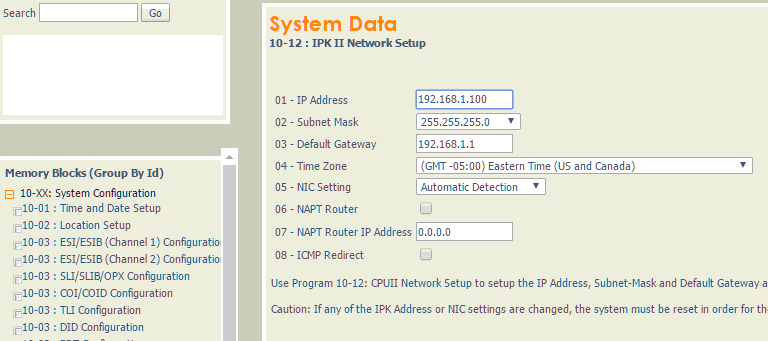
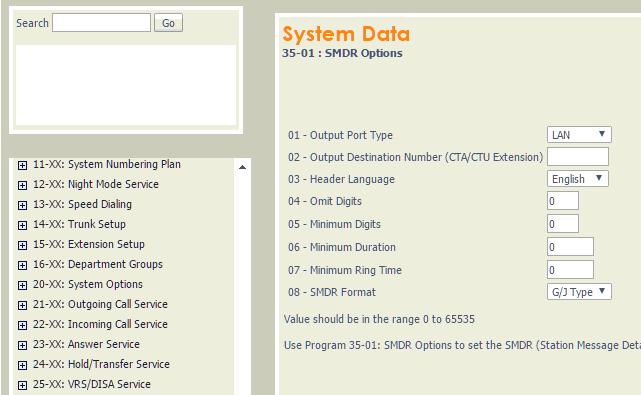
3. Go to 35-01 "SMDR Options" and set the specified options.
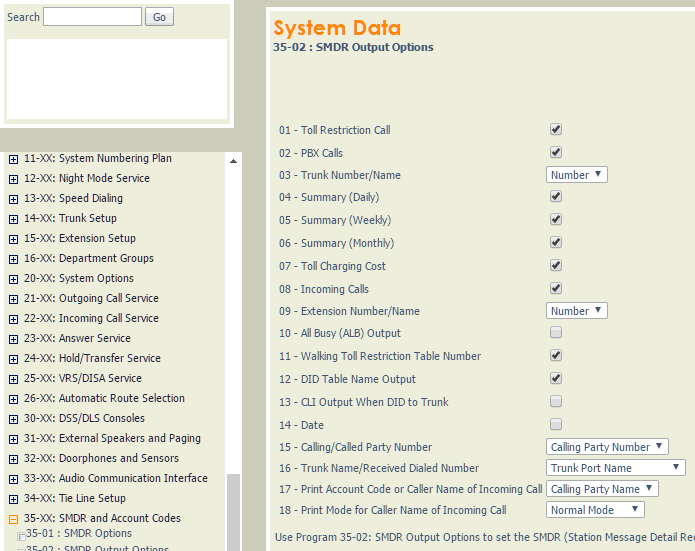
4. Go to 35-02 "SMDR Output Options".
Settings from the manufacturer's documentation
Taken from NEC Electra Elite IPK - smdr reports, Tracer-SMDR-Compatibility-Guide. Values are those stated in the documentation; confirm them against your firmware release.
| Setting | Documented value |
|---|---|
| SMDR default state | Disabled |
| Required component for SMDR | Software License |
Switching SMDR output on, as documented
- SMDR requires a connection using a CTA or CTU adapter, or through the serial port on the Electra Elite IPK II CPUII
- The LAN port only provides SMDR data through LAN-capable terminal programs such as HyperTerminal, not as a plain raw feed
- SMDR requires a connection to the CPUII via a COM port or LAN connection; a USB connection needs a USB driver
- SMDR can be output to up to eight simultaneous devices, one on the KSU COM port and one on the LAN port
Record format notes
- Program 35-01-09 selects date format (NA vs other); Program 35-02-14 switches between two fixed-width layouts (0/1); 35-02-15/17/18 control Caller ID name/number/DID display
- Class/call-type codes documented: POT, POTA, PIN, ALB, BRD, PTRS, IVIN (not IT/OG/IC)
- SMDR call buffer stores 500 calls; oldest data handling occurs when the buffer is full and the SMDR device is unavailable
- A general call-accounting compatibility guide separately lists 'NEC Electra Elite', 'NEC IPK 1', and 'NEC IPK 2' as three distinct SMDR formats with different field character positions
Configuring PBX Data Logger as a TCP client
Our software should work in the TCP client mode. It means that our software will initiate connection with the PBX and the PBX will work as a server. Add one or several PBX IP addresses here (the IP address of the NEC Electra Elite IPK II). The port number should match the port that you have defined within the PBX (60010 in the example below).
1. Add a new configuration with the TCP data source (if you didn't it before).
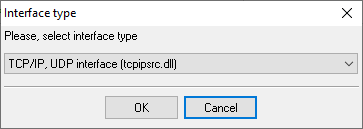
2. Configure the TCP settings as shown below.
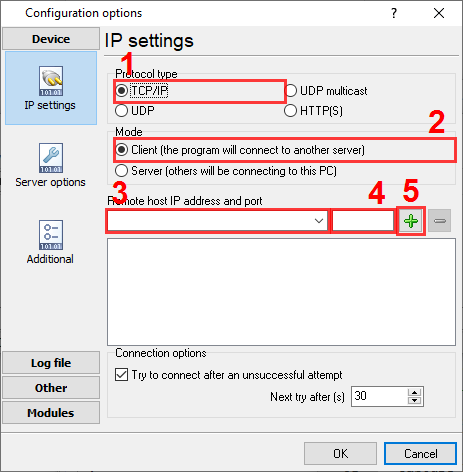
192.168.1.220
60010
192.168.1.220:60010
Selecting the correct parser for NEC Electra Elite IPK II (no date)

NEC Electra Elite IPK II (no date)
NEC Electra Elite IPK II (no date)
Data items
| Description | Data type | Column name |
|---|---|---|
| Call type | string | CALL_TYPE |
| Direction | string | DIRECTION |
| Call time | datetime | CALL_TIME |
| Line | string | TRUNK |
| Call duration | datetime | CALL_DURATION |
| Call duration (s) | integer | CALL_DURATION_S |
| Station | string | EXT |
| Dialed phone | string | DIALED_PHONE |
| Account code | string | ACC |
Reports and a database
Once records arrive, the logger writes them to a text file or to any ODBC database in real time, or hands them to the PBX Reports utility for manual, scheduled and e-mailed reports with a built-in web server. See exporting call log data to a database for the database setup.
Related NEC systems
NEC DSX 80NEC DSX 160
NEC Electra Elite IPK II
NEC ElectraElite IPK (CSV)
NEC Electra Elite, Aspire, DS2000, XN120 SMDR formats
All supported PBX systems
Note: Products and companies mentioned here are used only for definition and identification purposes and can be trademarks and/or registered trademarks of the respective companies.
Related topics: Advanced PBX Data Logger
hereCall logging Call accounting SMDR to SQL SMDR Listener Cables and signals