
Panasonic KX-NSX1000 and KX-NSX2000 SMDR setup
This page covers the Panasonic Panasonic KX-NSX1000 and Panasonic KX-NSX2000 variants in Advanced PBX Data Logger. Each section gives the connection settings, the parser to select and the fields the logger extracts for reports or a database; where the setup steps are the same for every variant they are given once. The settings apply to our logger; other call accounting software may expect a different configuration.
Quick facts
| Item | Panasonic KX-NSX1000 and KX-NSX2000 SMDR setup |
|---|---|
| Variants on this page | Panasonic KX-NSX1000, Panasonic KX-NSX2000 |
| Interface | LAN. The PBX accepts a connection on TCP port 2300; the logger connects to the PBX IP address. |
| Port | 2300 |
| Parsers | Panasonic KX-NSX1000, Panasonic KX-NSX2000 |
| Fields extracted | 17 |
| Other Panasonic systems | Panasonic KX-TDA30, TDA100, TDA200, TDA600 SMDR setup, Panasonic KX-T, KX-TD500, DBS and 576/816 SMDR formats |
Variants on this page
- Panasonic KX-NSX1000 · LAN, port 2300, 17 fields
- Panasonic KX-NSX2000 · LAN, port 2300, 17 fields
Panasonic KX-NSX1000
Parser: Panasonic KX-NSX1000
Connection: LAN. The PBX accepts a connection on TCP port 2300; the logger connects to the PBX IP address. Port 2300.
Fields extracted: 17
Printing Out SMDR Using LAN Port
Systems compatible: Panasonic KX-NS1000, Panasonic KX-NS700, Panasonic KX-NS500, Panasonic KX-NS300, Panasonic KX-NSX1000, Panasonic KX-NSX2000
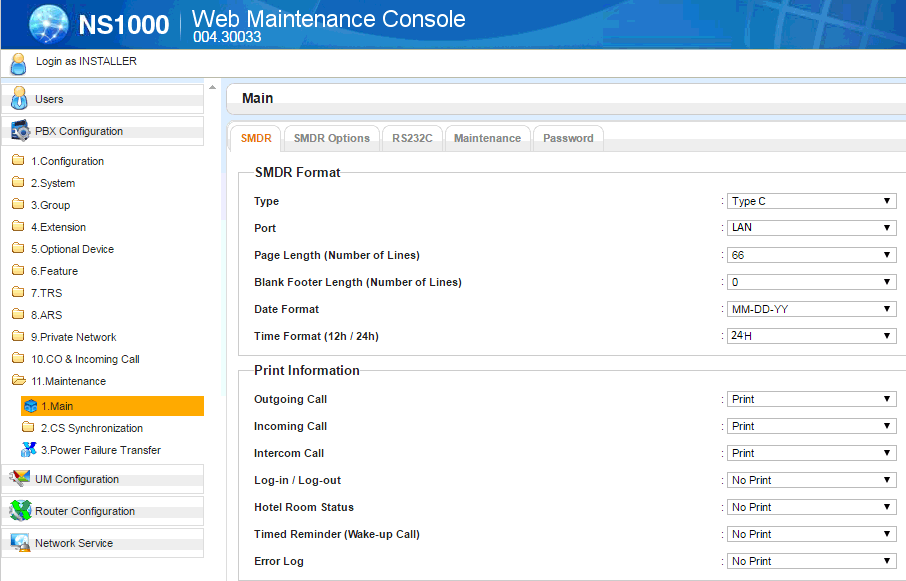
1. Go to 11.1 Maintenance → Main.
2. Set Port to LAN.
3. Under Print Information select which items you would like to get in the SMDR output.
3.1 Date format: MM-DD-YY.
3.2 Time format: 24H.
4. Click on SMDR Options tab.
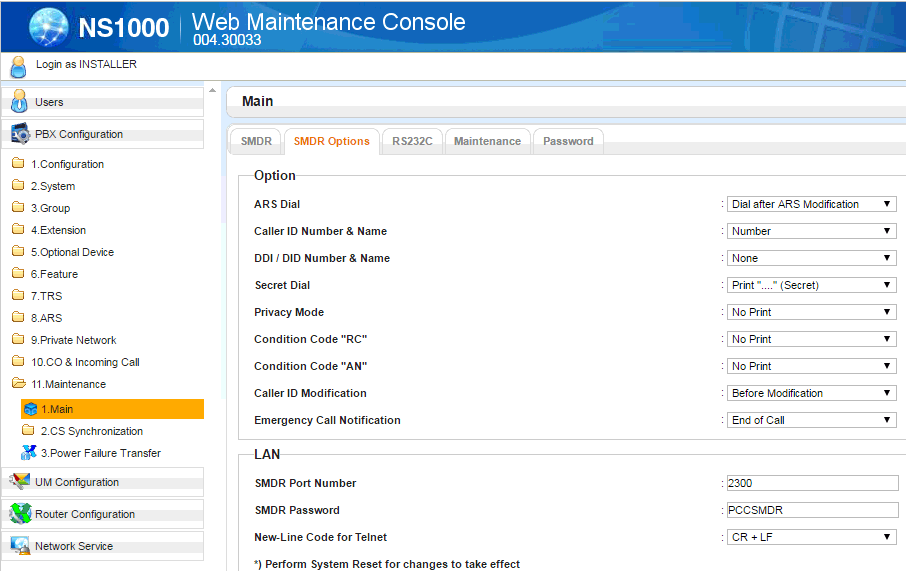
5. Note the default SMDR Port Number and Password. (These can be changed at your own discretion, but for this document we will use the default settings.)
6. Configure our software to send password to the PBX.
By default, the Panasonic NS1000 system requires a username/password (default: SMDR/PCCSMDR) to connect to the TCP/IP feed.
You must activate the "Panasonic KX-NCP1000" data query plugin (the plugin name on the image below is just an example), click the "Setup" button and specify the password:
Note: this feature is available in the Trial, Professional and Enterprise versions only.

Activating SMDR records for all calls
On the "SMDR options" page just enable condition codes to enable call logging for all stages "RC" and "AN". "RC" stands for received and "AN" for answered.
PBX rejects connections
In this case the logger received "Rejected" when it tries to connect.
Solution: try to change the default SMDR TCP port number from 2300 to 22300 in everywhere (the PBX settings, the settings in our software), and reboot your PBX.
Data items: Panasonic KX-NSX1000
| Description | Data type | Column name |
|---|---|---|
| Call date | datetime | CALL_DATE |
| Call time only | datetime | CALL_TIME2 |
| Call date and time | datetime | CALL_TIME |
| Extension | string | EXT |
| CO | string | TRUNK |
| Direction | string | DIRECTION |
| Call type | string | CALL_TYPE |
| DID name and number | string | DNIS |
| Caller number | string | CALLER_PHONE |
| Caller name | string | FLAG3 |
| Dialed number | string | DIALED_PHONE |
| Ring | datetime | RING |
| Call duration | datetime | CALL_DURATION |
| Call duration (s) | integer | CALL_DURATION_S |
| Cost | float | COST |
| Account code | string | ACC |
| Condition code | string | FLAG1 |
Panasonic KX-NSX2000
Parser: Panasonic KX-NSX2000
Connection: LAN. The PBX accepts a connection on TCP port 2300; the logger connects to the PBX IP address. Port 2300.
Fields extracted: 17
Printing Out SMDR Using LAN Port
Systems compatible: Panasonic KX-NS1000, Panasonic KX-NS700, Panasonic KX-NS500, Panasonic KX-NS300, Panasonic KX-NSX1000, Panasonic KX-NSX2000
1. Go to 11.1 Maintenance → Main.
2. Set Port to LAN.
3. Under Print Information select which items you would like to get in the SMDR output.
3.1 Date format: MM-DD-YY.
3.2 Time format: 24H.
4. Click on SMDR Options tab.
5. Note the default SMDR Port Number and Password. (These can be changed at your own discretion, but for this document we will use the default settings.)
6. Configure our software to send password to the PBX.
By default, the Panasonic NS1000 system requires a username/password (default: SMDR/PCCSMDR) to connect to the TCP/IP feed.
You must activate the "Panasonic KX-NCP1000" data query plugin (the plugin name on the image below is just an example), click the "Setup" button and specify the password:
Note: this feature is available in the Trial, Professional and Enterprise versions only.
Activating SMDR records for all calls
On the "SMDR options" page just enable condition codes to enable call logging for all stages "RC" and "AN". "RC" stands for received and "AN" for answered.
PBX rejects connections
In this case the logger received "Rejected" when it tries to connect.
Solution: try to change the default SMDR TCP port number from 2300 to 22300 in everywhere (the PBX settings, the settings in our software), and reboot your PBX.
Data items: Panasonic KX-NSX2000
| Description | Data type | Column name |
|---|---|---|
| Call date | datetime | CALL_DATE |
| Call time only | datetime | CALL_TIME2 |
| Call date and time | datetime | CALL_TIME |
| Extension | string | EXT |
| CO | string | TRUNK |
| Direction | string | DIRECTION |
| Call type | string | CALL_TYPE |
| DID name and number | string | DNIS |
| Caller number | string | CALLER_PHONE |
| Caller name | string | FLAG3 |
| Dialed number | string | DIALED_PHONE |
| Ring | datetime | RING |
| Call duration | datetime | CALL_DURATION |
| Call duration (s) | integer | CALL_DURATION_S |
| Cost | float | COST |
| Account code | string | ACC |
| Condition code | string | FLAG1 |
Connecting the logger
All variants on this page use the same connection settings; the steps below apply to each of them.
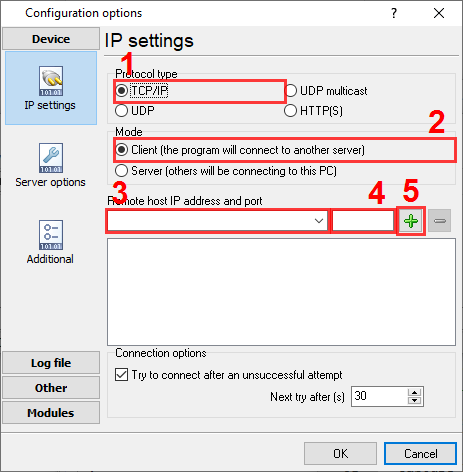
Configuring PBX Data Logger as a TCP client
Our software should work in the TCP client mode. It means that our software will initiate connection with the PBX and the PBX will work as a server. Add one or several PBX IP addresses here (the IP address of the Panasonic PBX). The port number should match the port that you have defined within the PBX (2300 in the example below).
1. Add a new configuration with the TCP data source (if you didn't it before).
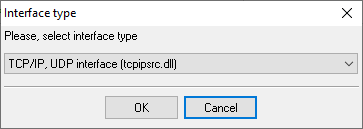
2. Configure the TCP settings as shown below.
192.168.1.220
2300
192.168.1.220:2300
Selecting the correct parser for Panasonic KX-NSX1000

Panasonic KX-NSX1000
Panasonic KX-NSX1000
Panasonic programming software
Panasonic KX-NS and KX-HTS systems are programmed in the Web Maintenance Console, opened in a browser at the IP address of the PBX. It is part of the system, not a download from AGG Software. The SMDR settings described on this page are made there; PBX Data Logger receives the records the console switches on.
Reports and a database
Once records arrive, the logger writes them to a text file or to any ODBC database in real time, or hands them to the PBX Reports utility for manual, scheduled and e-mailed reports with a built-in web server. See exporting call log data to a database for the database setup.
Related Panasonic systems
Panasonic KX-NS300-NS500-NS700Panasonic KX-NS1000
Panasonic KX-T1232 (DD-MM-YY)
Panasonic KX-T, KX-TD500, DBS and 576/816 SMDR formats
Panasonic KX-T1232
All supported PBX systems
Note: Products and companies mentioned here are used only for definition and identification purposes and can be trademarks and/or registered trademarks of the respective companies.
Related topics: Advanced PBX Data Logger
hereCall logging Call accounting SMDR to SQL SMDR Listener Cables and signals