
Toshiba Strata CTX SMDR setup and CDR format
This page shows how to get call records out of the Toshiba Strata CTX into Advanced PBX Data Logger: the connection settings, the parser to select and the 22 fields the logger extracts for reports or a database. The settings apply to our logger; other call accounting software may expect a different configuration.
Quick facts
| Item | Toshiba Strata CTX |
|---|---|
| Interface | LAN. The PBX sends records to the logger PC; the logger listens on TCP port 7777. |
| Port | 7777 |
| Parser to select | Toshiba Strata CTX |
| Fields extracted | 22 |
| Other Toshiba systems | Toshiba Strata DK SMDR formats |
| programming login (CTX WinAdmin default username) (documented) | administrator |
| programming login (CTX WinAdmin default password) (documented) | password |
| default IP address (CTX WinAdmin modem connection) (documented) | 192.168.255.254 |
| BSIS serial port speed default (Program 804) (documented) | 9600 bps |
CTX 670 SMDR logging through RS-232
Connect CTX 670 BSIS Port 1 (top port) to a computer with help of the 6-conductor line cord.
Default RS-232 settings: 9600 8-N-1
Verify in WinAdmin, that port 1 is properly setup for SMDR:
Program #803
Logical Device Number: 100 - SMDR
Device Connection: RS232
Device Port Number: 1
Program #804
BSIS Port: 1
Port Speed: 9600
Port Parity: None
Flow Control: None
Data Bits: 8
CTX 670 SMDR logging through LAN
Program #803
Logical Device Number: 100 - SMDR
Device Connection: LAN
Device Port Number: 1
Program #801
LAN Port Number: 1
Protocol: TCP
PC Operation Type: Client
Client IP Address: IP address of the computer with our software, e.g. 192.168.1.1
Client Port Number: Any number, for example: 7777.
This will only work with R4.1 software onwards. GCTU2, ACTU3, BCTU2, LCTU1 or LCTU2, HCTU1 will support LAN SMDR.
Program #512 - SMDR for System Assignment
Caller ID Field: Enable
B-Record for Abandoned Call: Disable
Automatic Number Identification (ANI): Enable
Authorization Code: Enable
End-of-Record CR: Enable
Program #514 - SMDR for OLG Assignment
Outgoing Records: Enable
Settings from the manufacturer's documentation
Taken from SynergyOne Toshiba Strata Phone System CTX100 CTX670CTX Programming Manual 120903. Values are those stated in the documentation; confirm them against your firmware release.
| Setting | Documented value |
|---|---|
| programming login (CTX WinAdmin default username) | administrator |
| programming login (CTX WinAdmin default password) | password |
| default IP address (CTX WinAdmin modem connection) | 192.168.255.254 |
| BSIS serial port speed default (Program 804) | 9600 bps |
| BSIS serial port parity default (Program 804) | Odd |
| BSIS serial port data bits default (Program 804) | 7 Bits |
| BSIS serial port flow control and wait timer defaults (Program 804) | Flow Control None; Wait Timer 30 seconds |
| LAN protocol / operation type defaults (Program 801) | Protocol TCP; PC Operation Type Server |
| Program 512 field defaults (SMDR for System Assignment) | Caller ID Field Enable; B-Record for Abandoned Call Disable; ANI Enable; Authorisation Code Disable; End-of-Record CR Enable |
| SMDR record buffer size (Strata Net / network SMDR) | 1000 records |
Switching SMDR output on, as documented
- In WinAdmin/eManager complete Program 801 (LAN device), then Program 803 (SMDR/SMDI/CTI port assignment), then Program 804 (BSIS RS-232 serial port), in that order, and click Submit.
- In Program 803, set Logical Device Number 100 = SMDR and set Device Connection to None, LAN or RS-232.
- To set call-content options, go to Services > Miscellaneous > SMDR and enter Program 512, 513 and 514 data.
Record format notes
- For Strata Net multi-node installs, the SMDR record format and conditions are the same as for a single-node system using the format adopted for Strata CTX.
- Station-to-station calls across Strata Net are internal and never generate SMDR records at any node; abandoned-call records are only generated for incoming calls over local trunks.
Configuring Advanced PBX Data Logger as a TCP server
Advanced PBX Data Logger should be configured to the TCP server mode and listen on 0.0.0.0:7777 (see below). The IP address 0.0.0.0 allows receiving data from all network connections on your computer. The port number should match the value from the SMDR settings in your CTX 670.
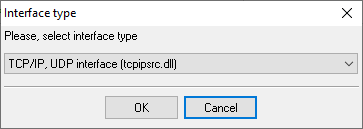
1. Add a new configuration with the TCP data source (if you didn't it before).
2. Configure the TCP settings as shown below.
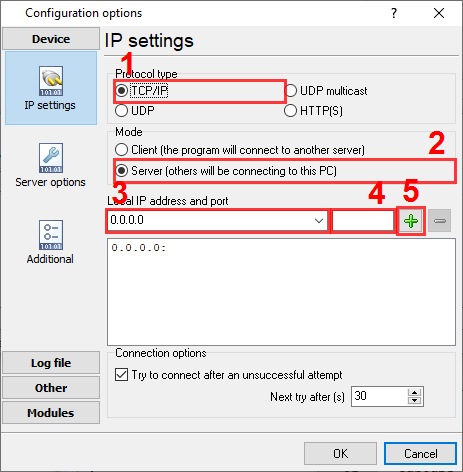
7777
7777
Selecting the correct parser for Toshiba Strata CTX

Toshiba Strata CTX
Toshiba Strata CTX
Data items
| Description | Data type | Column name |
|---|---|---|
| Record type | string | CALL_TYPE |
| Record type name | string | RECORD_TYPE_NAME |
| Record ID | string | FLAG1 |
| Node ID | string | FLAG2 |
| Source | string | FLAG3 |
| Destination | string | FLAG4 |
| Trunk | string | TRUNK |
| Extension | string | EXT |
| Call time | datetime | CALL_TIME |
| Call duration | datetime | CALL_DURATION |
| Call duration (s) | integer | CALL_DURATION_S |
| Call direction | string | DIRECTION |
| Phone | string | DIALED_PHONE |
| Phone (w/o city code) | string | DIALED_PHONE2 |
| Caller phone | string | CALLER_PHONE |
| DISA | string | DISA |
| ANI | string | ANI |
| DNIS | string | DNIS |
| AUXID1 | string | AUXID1 |
| AUXID2 | string | AUXID2 |
| Ringing time | datetime | RING |
| VM-CallId | string | CALLID |
Sample record
As delivered by the system; phone numbers, names and public addresses are masked.
N 013        DN104     T001xxxxx 06/06 14:37:41 00:01:38.0 141xxxxxxxx

N 014        DN103     T001xxxxx 06/06 14:38:59 00:01:43.0 410xxxxxxx

N 015        DN100     T001xxxxx 06/06 14:43:43 00:02:48.0 130xxxxxxxx
Reports and a database
Once records arrive, the logger writes them to a text file or to any ODBC database in real time, or hands them to the PBX Reports utility for manual, scheduled and e-mailed reports with a built-in web server. See exporting call log data to a database for the database setup.
Related Toshiba systems
Toshiba Strata CIXToshiba IP Edge
Toshiba Strata DK 14,40,424
Toshiba Strata DK 240,280
Toshiba Strata DK SMDR formats
All supported PBX systems
Note: Products and companies mentioned here are used only for definition and identification purposes and can be trademarks and/or registered trademarks of the respective companies.
Related topics: Advanced PBX Data Logger
hereCall logging Call accounting SMDR to SQL SMDR Listener Cables and signals