
RS232 Loopback Plug Pinout (DB9 and DB25) and How to Test a Serial Port
A loopback plug joins the outputs of a serial port to its own inputs, so everything the port sends comes straight back and every control line it raises is seen on the matching input. It needs no power and no device, which makes it the quickest way to find out whether a COM port, a USB to serial adapter or a cable is alive. The wiring below is the common one that every diagnostic program accepts; the only difference between published variants is whether the ring indicator is included.
DB9 loopback plug pinout
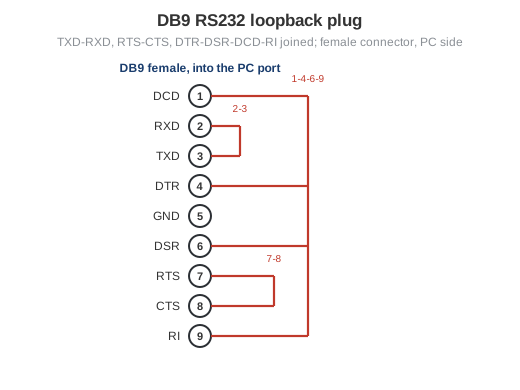
Fig. 1. DB9 loopback plug: a female connector with three jumper groups
| Jumper | DB9 pins | Signals | What it tests |
|---|---|---|---|
| 1 | 2 - 3 | RXD - TXD | data: sent bytes are received |
| 2 | 7 - 8 | RTS - CTS | hardware flow control lines |
| 3 | 1 - 4 - 6 - 9 | DCD - DTR - DSR - RI | modem status lines; RI (pin 9) is optional |
Pin numbers are those of the DB9 pinout of the PC port. The plug is a female connector, because the port on the computer is male. A data-only plug with just pins 2 and 3 joined is enough to check that bytes go out and come back, but a program that waits for DSR or DCD will not open the port through it.
DB25 loopback plug pinout
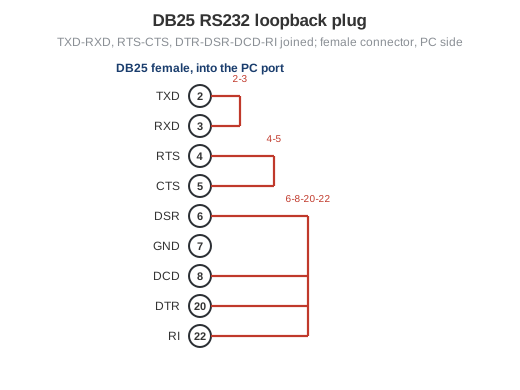
Fig. 2. DB25 loopback plug: the same three groups on the 25-pin connector
| Jumper | DB25 pins | Signals | What it tests |
|---|---|---|---|
| 1 | 2 - 3 | TXD - RXD | data: sent bytes are received |
| 2 | 4 - 5 | RTS - CTS | hardware flow control lines |
| 3 | 6 - 8 - 20 - 22 | DSR - DCD - DTR - RI | modem status lines; RI (pin 22) is optional |
Pin numbers follow the DB25 pinout of the PC port; the remaining pins of the full 25-pin RS232 connector are not used by PC hardware and stay open.
How to test a serial port with the loopback plug
- Plug it in. Put the loopback plug on the port itself to test the port, or on the far end of a straight cable to test the port and the cable together. A USB to serial adapter is tested the same way, with the plug on its DB9.
- Open the port in a terminal. Start Advanced Serial Port Monitor in terminal mode, pick the COM port, any baud rate, 8N1, flow control off. If the port does not open, the fault is in the driver or another program holds the port; see COM port errors.
- Send a line of text. With the plug on, the same text appears in the receive window. Without the plug, nothing comes back. Garbled characters point to a bad cable or a broken UART, not to the settings, because the port is talking to itself.
- Check the control lines. Raise RTS in the program: CTS turns on. Raise DTR: DSR and DCD turn on (and RI, if pin 9 is jumpered). A line that stays off marks a broken wire or a dead driver stage on that pin.
Steps 2 to 4 can also run automatically in Chrome or Edge: the free online serial port tester sends test data through the plug at every common baud rate from 1200 to 921600, compares each byte, and switches RTS and DTR to check CTS, DSR and DCD.
For a longer run, COM Port Stress Test pushes random data through the loop for hours and counts the errors, which catches marginal adapters and cables that pass a single line of text. To find out which COM number a port has, see how to list the COM ports in Windows.
Loopback related links
- RS232 connector pinouts: DB9, DB15, DB25 and RJ45 on one page.
- Null modem cable pinout, the cable to test two ports against each other.
- Serial data transfer cable: the same handshake loops used inside a cable.
- RS232 signals and what RTS, CTS, DTR and DSR mean.