
LG LDK-100 and LDK-300 SMDR setup
This page covers the LG LG LDK-100 and LG LDK-300 variants in Advanced PBX Data Logger. Each section gives the connection settings, the parser to select and the fields the logger extracts for reports or a database; where the setup steps are the same for every variant they are given once. The settings apply to our logger; other call accounting software may expect a different configuration.
Quick facts
| Item | LG LDK-100 and LDK-300 SMDR setup |
|---|---|
| Variants on this page | LG LDK-100, LG LDK-300 |
| Interface | Serial. The SMDR or printer port of the PBX is connected to a COM port; speed, data bits, parity and flow control must match the PBX. |
| Parsers | LG LDK-100, LG LDK-300 |
| Fields extracted | 12 |
| Other LG systems | LG and GoldStar SMDR formats: GHX, Starex, CS-1000 |
Variants on this page
- LG LDK-100 · Serial, 12 fields
- LG LDK-300 · Serial, 12 fields
LG LDK-100
Parser: LG LDK-100
Connection: Serial. The SMDR or printer port of the PBX is connected to a COM port; speed, data bits, parity and flow control must match the PBX.
Fields extracted: 12
Pinout and wiring
| PBX (9 pin) | PC (9 pin) |
|---|---|
| 1 | 1 |
| 3 | 3 |
| 4 | 4 |
| 6 | 2 |
SMDR enable
To print the SMDR, perform the following Steps:
- Activate the PC utility program on a networked PC.
- Connect the serial port of MBU to the serial port of the PC with the RS-232C cable.
- At the Attendant Station:
- Press the [TRANS/PGM] button.
- Dial 0111 (Station Base) or 0113 (Group Base).
- Enter the Station or Group range.
- The SMDR is printed to PC.
SMDR attributes
Station Message Detail Recording (SMDR) will provide details on both incoming and outgoing calls. As an assignable database option, if All Call Record is selected, incoming and outgoing local and long distance calls are all provided. The following items can be customized:
- Press the [TRANS/PGM] button.
- Dial 169.
- Follow the specific Procedure as listed in the Table.
| Option | Description | Procedure |
|---|---|---|
| LCD Time Display Mode | LCD Time formats. | + FLEX1 + 0 (24H) + [HOLD/SAVE] |
| LCD Date Display Mode | LCD date formats. | + FLEX2 + 0 (DDMMYY) + [HOLD/SAVE] |
- Press the [TRANS/PGM] button.
- Dial 177.
- Follow the specific Procedure as listed in the Table.
| Option | Description | Procedure |
|---|---|---|
| SMDR Save Enable | If this value is set to ON, maximum of 1000 SMDR data can be recorded in the System memory. | + FLEX1 + 1 (ON) + [HOLD/SAVE] |
| SMDR Print Enable | If this value is set to ON, SDMR data can be printed real time through the serial/MODEM/LAN port. | + FLEX2 + 1 (ON) + [HOLD/SAVE] |
| SMDR Recording Call Type | If this value is set to ALL, all outgoing CO calls will be recorded by the SMDR. | + FLEX3 + 0 (ALL CALLS) + [HOLD/SAVE] |
| Print Incoming Call | If value is set to ON, all incoming calls can be printed. | + FLEX5 + 1 (ON) + [HOLD/SAVE] |
| Print Lost Call | If value is set to ON, lost calls are printed Lost calls are defined as calls that are unanswered. | + FLEX6 + 1 (ON) + [HOLD/SAVE] |
| Records in Detail | If this value is set to OFF, only total calls, total metering count and total cost for individual Station information will be recorded. | + FLEX7 + 0 (OFF) + [HOLD/SAVE] |
| SMDR Dial Digit Hidden | If this value is set non-zero value, the printed digits from right or left will be replaced with a "*" symbol up to the designated value. | + FLEX8 + 0 (OFF) + [HOLD/SAVE] |
| SMDR Start Timer | If this value is set non-zero value, only the outgoing CO call more than this value time is served SDMR. | + FLEX12 + 000 (OFF) + [HOLD/SAVE] |
| Print Caller Number | If this value is set to ON, the caller number is printed when receiving an incoming SMDR call. | + FLEX16 + 1 (ON) + [HOLD/SAVE] |
SMDR attributes in PCADMIN
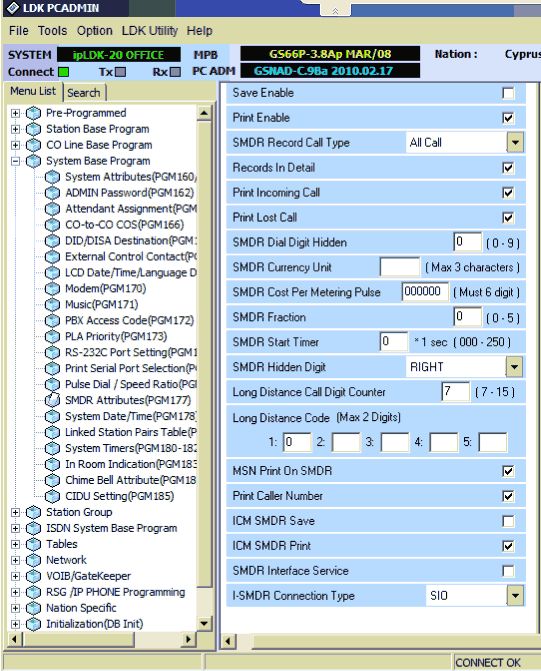
Data items: LG LDK-100
| Description | Data type | Column name |
|---|---|---|
| Station | string | FLAG2 |
| External | string | EXT |
| Call duration | datetime | CALL_DURATION |
| Call duration (s) | integer | CALL_DURATION_S |
| Call time | datetime | CALL_TIME |
| Call type | string | CALL_TYPE |
| Direction | string | DIRECTION |
| Phone | string | DIALED_PHONE |
| Act | string | FLAG3 |
| Count | string | FLAG4 |
| Cost | float | COST |
| Account code | string | ACC |
Sample record
As delivered by the system; phone numbers, names and public addresses are masked.
9297 101   001 00:00:12 25/05/05 10:07 I RING 00:38
9294 103   003 00:01:04 25/05/05 10:06 t
9297 140   001 00:04:57 25/05/05 10:07 t
LG LDK-300
Parser: LG LDK-300
Connection: Serial. The SMDR or printer port of the PBX is connected to a COM port; speed, data bits, parity and flow control must match the PBX.
Fields extracted: 12
Pinout and wiring
| PBX (9 pin) | PC (9 pin) |
|---|---|
| 1 | 1 |
| 3 | 3 |
| 4 | 4 |
| 6 | 2 |
SMDR enable
To print the SMDR, perform the following Steps:
- Activate the PC utility program on a networked PC.
- Connect the serial port of MBU to the serial port of the PC with the RS-232C cable.
- At the Attendant Station:
- Press the [TRANS/PGM] button.
- Dial 0111 (Station Base) or 0113 (Group Base).
- Enter the Station or Group range.
- The SMDR is printed to PC.
SMDR attributes
Station Message Detail Recording (SMDR) will provide details on both incoming and outgoing calls. As an assignable database option, if All Call Record is selected, incoming and outgoing local and long distance calls are all provided. The following items can be customized:
- Press the [TRANS/PGM] button.
- Dial 169.
- Follow the specific Procedure as listed in the Table.
| Option | Description | Procedure |
|---|---|---|
| LCD Time Display Mode | LCD Time formats. | + FLEX1 + 0 (24H) + [HOLD/SAVE] |
| LCD Date Display Mode | LCD date formats. | + FLEX2 + 0 (DDMMYY) + [HOLD/SAVE] |
- Press the [TRANS/PGM] button.
- Dial 177.
- Follow the specific Procedure as listed in the Table.
| Option | Description | Procedure |
|---|---|---|
| SMDR Save Enable | If this value is set to ON, maximum of 1000 SMDR data can be recorded in the System memory. | + FLEX1 + 1 (ON) + [HOLD/SAVE] |
| SMDR Print Enable | If this value is set to ON, SDMR data can be printed real time through the serial/MODEM/LAN port. | + FLEX2 + 1 (ON) + [HOLD/SAVE] |
| SMDR Recording Call Type | If this value is set to ALL, all outgoing CO calls will be recorded by the SMDR. | + FLEX3 + 0 (ALL CALLS) + [HOLD/SAVE] |
| Print Incoming Call | If value is set to ON, all incoming calls can be printed. | + FLEX5 + 1 (ON) + [HOLD/SAVE] |
| Print Lost Call | If value is set to ON, lost calls are printed Lost calls are defined as calls that are unanswered. | + FLEX6 + 1 (ON) + [HOLD/SAVE] |
| Records in Detail | If this value is set to OFF, only total calls, total metering count and total cost for individual Station information will be recorded. | + FLEX7 + 0 (OFF) + [HOLD/SAVE] |
| SMDR Dial Digit Hidden | If this value is set non-zero value, the printed digits from right or left will be replaced with a "*" symbol up to the designated value. | + FLEX8 + 0 (OFF) + [HOLD/SAVE] |
| SMDR Start Timer | If this value is set non-zero value, only the outgoing CO call more than this value time is served SDMR. | + FLEX12 + 000 (OFF) + [HOLD/SAVE] |
| Print Caller Number | If this value is set to ON, the caller number is printed when receiving an incoming SMDR call. | + FLEX16 + 1 (ON) + [HOLD/SAVE] |
SMDR attributes in PCADMIN
Data items: LG LDK-300
| Description | Data type | Column name |
|---|---|---|
| Station | string | FLAG2 |
| External | string | EXT |
| Call duration | datetime | CALL_DURATION |
| Call duration (s) | integer | CALL_DURATION_S |
| Call time | datetime | CALL_TIME |
| Call type | string | CALL_TYPE |
| Direction | string | DIRECTION |
| Phone | string | DIALED_PHONE |
| Act | string | FLAG3 |
| Count | string | FLAG4 |
| Cost | float | COST |
| Account code | string | ACC |
Sample record
As delivered by the system; phone numbers, names and public addresses are masked.
044 : ********** -> 4169
044 : ********** -> 4169
1097 4151  032 00:06:36 03/12/18 14:52 I042xxxxxxx                                   597xxxxx
Connecting the logger
All variants on this page use the same connection settings; the steps below apply to each of them.
Configuring a COM port
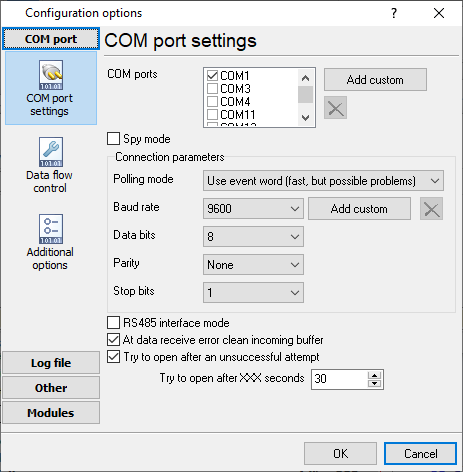
The COM port number should match the number in your system. You can check the correct port number in Devices Manager → Ports.
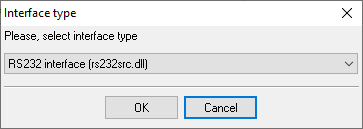
1. Add a new configuration with the RS232 data source (if you didn't it before).
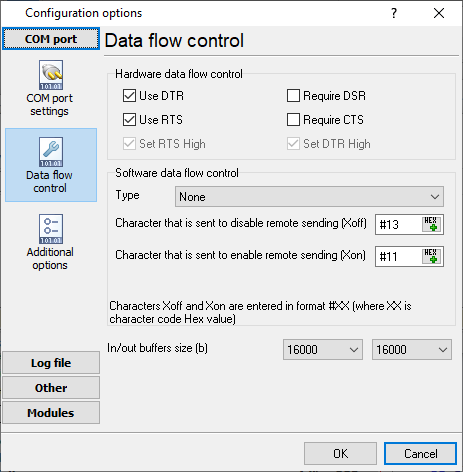
2. Select the COM port and configure the communication settings for your PBX corresponding to your PBX settings.
Selecting the correct parser for LG LDK-100

LG LDK-100
LG LDK-100
LG programming software
LG LDK and Aria SOHO systems are programmed with the PC Admin application (LDK PC Admin), which comes from LG, Ericsson-LG or your dealer, not from AGG Software. The SMDR settings on this page are made there; PBX Data Logger receives the records they switch on.
Reports and a database
Once records arrive, the logger writes them to a text file or to any ODBC database in real time, or hands them to the PBX Reports utility for manual, scheduled and e-mailed reports with a built-in web server. See exporting call log data to a database for the database setup.
Related LG systems
LG GHX-46LG GHX-1232
LG Starex VSP
LG and GoldStar SMDR formats: GHX, Starex, CS-1000
LG ipLDK-20
All supported PBX systems
Note: Products and companies mentioned here are used only for definition and identification purposes and can be trademarks and/or registered trademarks of the respective companies.
Related topics: Advanced PBX Data Logger
hereCall logging Call accounting SMDR to SQL SMDR Listener Cables and signals