
VoIP PBX, softswitch and gateway CDR formats
Advanced PBX Data Logger includes 13 parsers for VoIP PBX, softswitch and gateway systems. This page gathers them in one place. For each system you will find how the call records reach the logger, the parser to select, and the 270 fields in total that these parsers extract for PBX Reports or a database. Of these, 1 over TCP server, 1 over TCP client; the rest are identified by their record layout and can arrive over a serial port or a LAN connection. The settings apply to our logger; other call accounting software may expect a different configuration.
Systems on this page
- 3COM NBX (XML, v6) · Serial or TCP, 11 fields
- AudioCodes Gateway (Extended) · Serial or TCP, 79 fields
- AYC IPcts · Serial or TCP, 9 fields
- NCH AXON · Serial or TCP, 10 fields
- Opticon IP · Serial or TCP, 13 fields
- Quintum Tenor · Serial or TCP, 11 fields
- Snom ONE · TCP server, 10 fields
- Sphere VOIP Softswitch · Serial or TCP, 9 fields
- Splicecom Maximiser · TCP client, 42 fields
- Talkswitch · Serial or TCP, 10 fields
- Telepo 3 · Serial or TCP, 38 fields
- Telnyx CDR (CSV) · Serial or TCP, 17 fields
- VOISpeed · Serial or TCP, 11 fields
Connecting the logger
Add a data source in PBX Data Logger that matches the interface named in each section: RS232 for a serial SMDR port, TCP client when the PBX accepts connections, TCP server when the PBX pushes records to the logger, or FTP for systems that write CDR files. Then open Modules → Query Parse Filter → Data query, click Setup and select the parser named in the section. The general steps are shown on the SMDR listener page; every other supported system is listed on the supported PBX index.
3COM NBX (XML, v6)
Parser: 3COM NBX (XML, v6)
Connection: Serial printer port or LAN, whichever the system uses for SMDR output. The record layout identifies the format.
Fields extracted: 11
Data items: 3COM NBX (XML, v6)
| Description | Data type | Column name |
|---|---|---|
| Call time | datetime | CALL_TIME |
| Call type | integer | CALL_TYPE |
| Call direction | string | DIRECTION |
| Start time | datetime | START_TIME |
| End time | datetime | END_TIME |
| Call duration | datetime | CALL_DURATION |
| Call duration (s) | integer | CALL_DURATION_S |
| Caller phone | string | CALLER_PHONE |
| Dialed phone | string | DIALED_PHONE |
| Ext | string | EXT |
| CO | string | TRUNK |
Sample record
As delivered by the system; phone numbers, names and public addresses are masked.
<CDR>
<B0>2008/01/02</B0>     // date
<B1>2</B1>		// sequence number
<B2>1</B2>		// call type 0 - internal, 1 - outgoing, 2 incoming
<B7>07:53:33</B7>	// start time
<B8>07:54:06</B8>	// stop time
<B9>32</B9> 		// ??
<B11>Local</B11>	// Description
<B13>1</B13>
<B14>204071</B14>
<B3><P1>1703</P1><P2>Name Surname  </P2><P4>Terminal</P4><P11>526xxxx</P11><P5>ORIG</P5><P8>004</P8><P9>Name Surname  </P9><P10>952xxxxx</P10></B3>
<B4><P1>7292</P1><P2>Trunk</P2><P4>PRI Channel</P4><P11>1703</P11><P5>TERM</P5></B4>
</CDR>
AudioCodes Gateway (Extended)
Parser: AudioCodes Gateway (Extended)
Connection: Serial printer port or LAN, whichever the system uses for SMDR output. The record layout identifies the format.
Fields extracted: 79
The parser is degisned for the following exact fields order. The configuration process is similar to AudioCodes Mediant 1000.
Call ID
Session ID
Report Type
Leg ID
Endpoint Type
Call Orig
Source IP
Destination IP
Remote IP
Source Port
Dest Port
Remote Port
Call Duration
Termination Side
Termination Raison
Setup Time
Connect Time
Release Time
Redirect Reason
IP Group Name
Transport Type
Termination Reason Category
IP Profile Name
Media Realm Name
SIP Termination Reason
SIP Termination Description
Caller Display ID
Callee Display ID
SIPInterface Name
Termination Side Yes No
ProxySet Name
Call Succes
Coder Type
Local Packet Loss
Local Round Trip Delay
Local Jitter
Remote Packet Loss
Remote Round Trip Delay
Remote Jitter
Local RTP IP
Local RTP Port
Remote RTP IP
Remote RTP Port
RTP IP DiffServ
Local MOS CQ
Latched RTP IP
Latched RTP Port
Coder Transcoding
MC Name
Source URI
Destination URI
Source URI Before Manipulation
Destination URI Before Manipula
Redirect URI
Redirect URI Before Manipulatio
Source Username
Destination Username
Source Username Before Manipula
Destination Username Before Man
Source Host
Destination Host
Source Host Before Manipulation
Destination Host Before Manipul
Remote SIP User Agent
Settings from the manufacturer's documentation
Taken from AudioCodes CDR Field Description. Values are those stated in the documentation; confirm them against your firmware release.
Record format notes
- "Latched RTP IP"/"Latched RTP Port" report the remote address/port the device latched onto via the NAT-traversal RTP latching mechanism, included by default in SBC media CDRs.
- Proxy Set name and SIP Interface name fields are each strings of up to 40 characters.
- The Coder Transcoding field records whether coder transcoding occurred during the SBC call.
Data items: AudioCodes Gateway (Extended)
| Description | Data type | Column name |
|---|---|---|
| Call type | string | CALL_TYPE |
| Call time | datetime | CALL_TIME |
| Connect time | datetime | CONNECT_TIME |
| Release time | datetime | RELEASE_TIME |
| Ring | datetime | RING |
| Call Identifier | string | FLAG6 |
| Call Originator | string | FLAG5 |
| Direction | string | DIRECTION |
| Trunk | string | TRUNK |
| Ext | string | EXT |
| Dialed IP | string | DIALED_PHONE |
| Caller phone | string | CALLER_PHONE |
| Source URL | string | FLAG1 |
| Destination URL | string | FLAG2 |
| Call duration (sec) | integer | CALL_DURATION_S |
| Call duration | datetime | CALL_DURATION |
| Termination Reason | string | FLAG7 |
| Caller Display ID | string | FLAG3 |
| Callee Display ID | string | FLAG4 |
| Call ID | string | CALL_ID |
| Session ID | string | SESSION_ID |
| Report Type | string | REPORT_TYPE |
| Leg ID | string | LEG_ID |
| Endpoint Type | string | ENDPOINT_TYPE |
| Call Orig | string | CALL_ORIG |
| Source IP | string | SOURCE_IP |
| Destination IP | string | DESTINATION_IP |
| Remote IP | string | REMOTE_IP |
| Source Port | string | SOURCE_PORT |
| Dest Port | string | DEST_PORT |
| Remote Port | string | REMOTE_PORT |
| Termination Side | string | TERMINATION_SIDE |
| Termination Raison | string | TERMINATION_RAISON |
| Redirect Reason | string | REDIRECT_REASON |
| IP Group Name | string | IP_GROUP_NAME |
| Transport Type | string | TRANSPORT_TYPE |
| Termination Reason Category | string | TERMINATION_REASON_CATEGORY |
| IP Profile Name | string | IP_PROFILE_NAME |
| Media Realm Name | string | MEDIA_REALM_NAME |
| SIP Termination Reason | string | SIP_TERMINATION_REASON |
| SIP Termination Description | string | SIP_TERMINATION_DESCRIPTION |
| Caller Display ID | string | CALLER_DISPLAY_ID |
| Callee Display ID | string | CALLEE_DISPLAY_ID |
| SIPInterface Name | string | SIPINTERFACE_NAME |
| Termination Side Yes No | string | TERMINATION_SIDE_YES_NO |
| ProxySet Name | string | PROXYSET_NAME |
| Call Succes | string | CALL_SUCCES |
| Coder Type | string | CODER_TYPE |
| Local Packet Loss | string | LOCAL_PACKET_LOSS |
| Local Round Trip Delay | string | LOCAL_ROUND_TRIP_DELAY |
| Local Jitter | string | LOCAL_JITTER |
| Remote Packet Loss | string | REMOTE_PACKET_LOSS |
| Remote Round Trip Delay | string | REMOTE_ROUND_TRIP_DELAY |
| Remote Jitter | string | REMOTE_JITTER |
| Local RTP IP | string | LOCAL_RTP_IP |
| Local RTP Port | string | LOCAL_RTP_PORT |
| Remote RTP IP | string | REMOTE_RTP_IP |
| Remote RTP Port | string | REMOTE_RTP_PORT |
| RTP IP DiffServ | string | RTP_IP_DIFFSERV |
| Local MOS CQ | string | LOCAL_MOS_CQ |
| Latched RTP IP | string | LATCHED_RTP_IP |
| Latched RTP Port | string | LATCHED_RTP_PORT |
| Coder Transcoding | string | CODER_TRANSCODING |
| MC Name | string | MC_NAME |
| Source URI | string | SOURCE_URI |
| Destination URI | string | DESTINATION_URI |
| Source URI Before Manipulation | string | SOURCE_URI_BEFORE_MANIPULATION |
| Destination URI Before Manipula | string | DESTINATION_URI_BEFORE_MANIPULA |
| Redirect URI | string | REDIRECT_URI |
| Redirect URI Before Manipulatio | string | REDIRECT_URI_BEFORE_MANIPULATIO |
| Source Username | string | SOURCE_USERNAME |
| Destination Username | string | DESTINATION_USERNAME |
| Source Username Before Manipula | string | SOURCE_USERNAME_BEFORE_MANIPULA |
| Destination Username Before Man | string | DESTINATION_USERNAME_BEFORE_MAN |
| Source Host | string | SOURCE_HOST |
| Destination Host | string | DESTINATION_HOST |
| Source Host Before Manipulation | string | SOURCE_HOST_BEFORE_MANIPULATION |
| Destination Host Before Manipul | string | DESTINATION_HOST_BEFORE_MANIPUL |
| Remote SIP User Agent | string | REMOTE_SIP_USER_AGENT |
AYC IPcts
Parser: AYC IPcts
Connection: Serial printer port or LAN, whichever the system uses for SMDR output. The record layout identifies the format.
Fields extracted: 9
Data items: AYC IPcts
| Description | Data type | Column name |
|---|---|---|
| Call time | datetime | CALL_TIME |
| Call type | string | CALL_TYPE |
| Direction | string | DIRECTION |
| CO | string | TRUNK |
| Ext | string | EXT |
| Phone | string | DIALED_PHONE |
| Account | string | ACC |
| Call duration | datetime | CALL_DURATION |
| Call duration (s) | integer | CALL_DURATION_S |
Sample record
As delivered by the system; phone numbers, names and public addresses are masked.
26/11/05 14:10 UNA 01  801    201          012xxxxxxxx 01    550066 00:00:28
27/11/05 12:16 UNA 01  801    201          012xxxxxxxx 01    550066 00:00:27
27/11/05 16:34 UNA 01  801    201          012xxxxxxxx 01    550066 00:00:27
NCH AXON
Parser: NCH AXON
Connection: Serial printer port or LAN, whichever the system uses for SMDR output. The record layout identifies the format.
Fields extracted: 10
Data items: NCH AXON
| Description | Data type | Column name |
|---|---|---|
| Call date | datetime | CALL_DATE |
| Call time | datetime | CALL_TIME |
| Call start time | datetime | START_TIME |
| Call start time | datetime | END_TIME |
| Call duration | datetime | CALL_DURATION |
| Call duration (s) | integer | CALL_DURATION_S |
| Direction | string | DIRECTION |
| Ext | string | EXT |
| Dialed phone | string | DIALED_PHONE |
| Dialed phone | string | FLAG1 |
Sample record
As delivered by the system; phone numbers, names and public addresses are masked.
2006-12-11,22:12:39,00:21,00:13,"111","sip:110@192.168.15.100"
2006-12-11,22:12:07,01:21,01:11,"sip:305xxxxxxx@10.0.5.24","701"
2006-12-11,22:15:19,01:04,00:54,"110","sip:930xxxxxxxx@192.168.15.100"
Opticon IP
Parser: Opticon IP
Connection: Serial printer port or LAN, whichever the system uses for SMDR output. The record layout identifies the format.
Fields extracted: 13
Data items: Opticon IP
| Description | Data type | Column name |
|---|---|---|
| Ext | string | EXT |
| CO | string | TRUNK |
| Call duration | datetime | CALL_DURATION |
| Call duration (s) | integer | CALL_DURATION_S |
| Call time | datetime | CALL_TIME |
| Phone | string | CALL_TYPE |
| Direction | string | DIRECTION |
| Phone | string | DIALED_PHONE |
| Ring | datetime | RING |
| ACT | string | FLAG1 |
| CNT | string | FLAG2 |
| Cost | float | COST |
| Account | string | ACC |
Sample record
As delivered by the system; phone numbers, names and public addresses are masked.
9095 100   007 00:00:11 17/10/07 11:27 I RING 00:02                                           *
9089 110   007 00:00:28 17/10/07 11:22 t                                                      *
9089 102   007 00:01:13 17/10/07 11:23 t
Quintum Tenor
Parser: Quintum Tenor
Connection: Serial printer port or LAN, whichever the system uses for SMDR output. The record layout identifies the format.
Fields extracted: 11
Data items: Quintum Tenor
| Description | Data type | Column name |
|---|---|---|
| Dialed phone | string | DIALED_PHONE |
| Call duration (s) | integer | CALL_DURATION_S |
| Call duration | datetime | CALL_DURATION |
| Call connected time | datetime | CALL_TIME |
| Account | string | ACC |
| Trunk | string | TRUNK |
| Ext | string | EXT |
| Direction | string | DIRECTION |
| Call type | string | CALL_TYPE |
| In line | string | FLAG1 |
| Out line | string | FLAG2 |
Sample record
As delivered by the system; phone numbers, names and public addresses are masked.
5260,228xxxxxxx,50,200xxxxxxxxxxx,200xxxxxxxxxxx,200xxxxxxxxxxx,-, 10.9.1.199, 10.9.1.198,-,1,1,1,2,-,-,-,0,0,0,221xxxx,-,5272,5149,
5261,-,0,200xxxxxxxxxxx,-,200xxxxxxxxxxx,16, 10.9.1.199,-,-,1,0,1,10,-,-,-,0,0,0,-,-,5275,-,
5262,-,0,200xxxxxxxxxxx,-,200xxxxxxxxxxx,16, 10.9.1.199,-,-,1,0,1,17,-,-,-,0,0,0,-,-,5276,-,
Snom ONE
Parser: Snom ONE
Connection: LAN. The PBX sends records to the logger PC; the logger listens on TCP port 7777.
Fields extracted: 10
Configuring the IP PBX
1. Within the administration console set the settings from the following figure. Replace <ip-addr> and <port> with the real IP address and port of a computer where Data Logger is located. For example: cdr:192.168.1.101:7777
2. In the format template field you must specify the format: $w$2o$5x$5e$15c$5A$5d
The format can be changed using the link http://localhost/reh_status.htm?save=save&cdr_format=$w$2o$5x$5e$15c$5A$5d
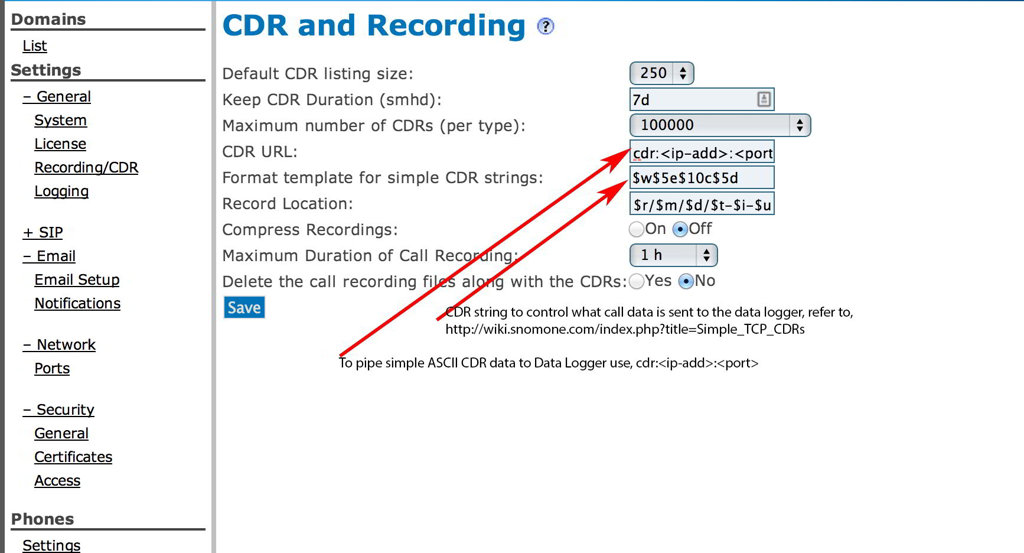
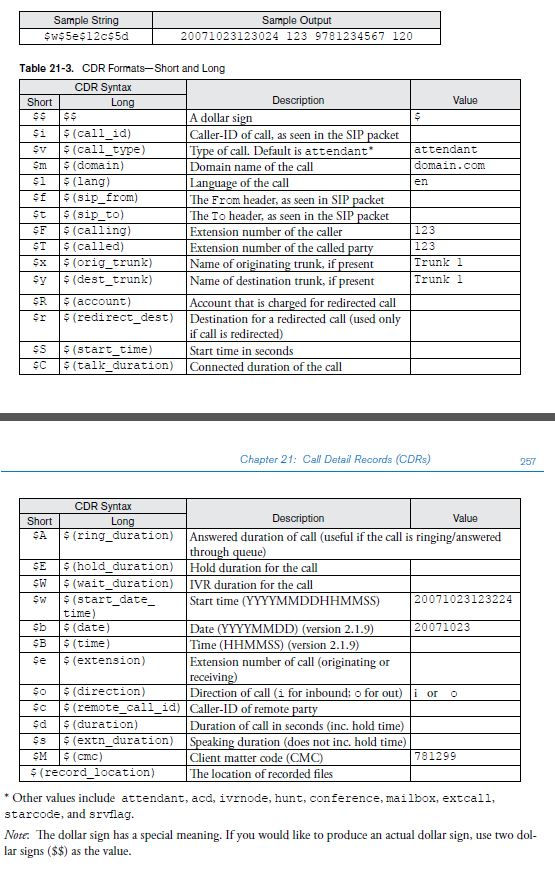
SMDR Format String
The following table can help you customize the SMDR record format. Please, note that if you'll customize the format our software will not decode incoming data. The parser is designed foe the default format "$w$2i$5x$5e$15c$5A$5d".
Data items: Snom ONE
| Description | Data type | Column name |
|---|---|---|
| Call time | datetime | CALL_TIME |
| Call type | string | CALL_TYPE |
| Direction | string | DIRECTION |
| Trunk | string | TRUNK |
| External | string | EXT |
| Phone | string | DIALED_PHONE |
| Ring duration (s) | integer | RING_S |
| Line | string | FLAG6 |
| Call duration (s) | integer | CALL_DURATION_S |
| Call duration | datetime | CALL_DURATION |
Sample record
As delivered by the system; phone numbers, names and public addresses are masked.
201xxxxxxxxxxx  100xxxxxxxxxx   88
201xxxxxxxxxxx     811xxxxxxx  101
201xxxxxxxxxxx  102       102   37
Sphere VOIP Softswitch
Parser: Sphere VOIP Softswitch
Connection: Serial printer port or LAN, whichever the system uses for SMDR output. The record layout identifies the format.
Fields extracted: 9
Data items: Sphere VOIP Softswitch
| Description | Data type | Column name |
|---|---|---|
| Call time | datetime | CALL_TIME |
| Call duration (s) | integer | CALL_DURATION_S |
| Call duration | datetime | CALL_DURATION |
| Call type | string | CALL_TYPE |
| Direction | string | DIRECTION |
| Ext | string | EXT |
| Dialed phone | string | DIALED_PHONE |
| CO | string | TRUNK |
| Account code | string | ACC |
Sample record
As delivered by the system; phone numbers, names and public addresses are masked.
2      ,181xxxxx,outside caller ,pstn           ,303xxxxxxx       ,VM Port             ,svm          ,12@spheremgc1  ,Name Surname          ,ext              ,6994               ,0      ,3     ,118xxxxxxx,1       ,Trunk:1 ,         ,         ,              ,
3      ,181xxxxx,outside caller ,pstn           ,303xxxxxxx       ,VM Port             ,svm          ,12@spheremgc1  ,Name Surname          ,ext              ,6994               ,0      ,3     ,118xxxxxxx,40      ,Trunk:1 ,         ,         ,              ,
2      ,181xxxxx,outside caller ,pstn           ,303xxxxxxx       ,VM Port             ,svm          ,12@spheremgc1  ,Name Surname          ,ext              ,6994               ,0      ,3     ,118xxxxxxx,40      ,Trunk:1 ,         ,         ,              ,
Splicecom Maximiser
Parser: Splicecom Maximiser
Connection: LAN. The PBX accepts a connection on TCP port 4001; the logger connects to the PBX IP address.
Fields extracted: 42
Changing the Call Logging Password
The Call Logging Password configurable in PBX can be used to protect access:
- From the Management information list select System
- Beside the Call Logging Password field click on Change
- In the Script Prompt enter the password required
- Select OK
- Re-enter your password to confirm the change
- Select OK
- Submit the change
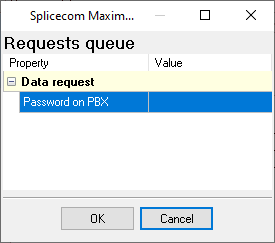
No logging output will occur without the Call Logging password being sent Advanced PBX Data Logger. So, you should activate the data query plugin and specify the password (fig. 2,3)

Settings from the manufacturer's documentation
Taken from Splicecom Maximiser call log format v3.2.2. Values are those stated in the documentation; confirm them against your firmware release.
| Setting | Documented value |
|---|---|
| Call Logger TCP port | 4001 |
Switching SMDR output on, as documented
- Immediately after connecting, send the configured Call Logging Password (newline-terminated, in a single block/packet); no log output occurs until the password is received.
- Set the Call Logging Password in the PBX's Management information list under System, using the Change link next to the Call Logging Password field.
Record format notes
- The documented record has 36 named comma-separated fields ending with B_OnBehalfOfNumber and B_OnBehalfOfNumber, terminated by a newline.
- A separate log entry is output for each target leg of a call, and only once that leg has been disconnected; ConnectedTime is 0 if the leg never connected.
- ConnectedStat is coded 0=none, 1=connected, 2=sent to voicemail.
- TransferedCall is coded 0=not transferred, 1=primary, 2=secondary, 3=abandoned, 4=park, 5=un-park.
Data items: Splicecom Maximiser
| Description | Data type | Column name |
|---|---|---|
| Call time | datetime | CALL_TIME |
| Cost centre (user or department) | string | FLAG1 |
| Trunk (B) | string | TRUNK_B |
| Trunk (A) | string | TRUNK_A |
| Call type | string | DIRECTION |
| Trunk | string | TRUNK |
| Extension | string | EXT |
| Caller number | string | CALLER_PHONE |
| Caller name | string | FLAG3 |
| Dialed number (A) | string | DIALED_PHONE |
| On behalf of (B) | string | ONBEHALFOF_B |
| Name (B) | string | NAME_B |
| Number (B) | string | NUMBER_B |
| Call duration (s) | integer | CALL_DURATION_S |
| Call duration | datetime | CALL_DURATION |
| Connected time (s) | integer | CONNECTED_TIME |
| Ring duration | datetime | RING |
| Account name | string | ACC |
| Account number | string | FLAG5 |
| Connected status | string | FLAG6 |
| Informational Field (B) | string | REM_B |
| Original cost centre | string | ORIG_COST_CENTRE |
| Call Record GUID | string | FLAG2 |
| Secondary transferred call | string | TRANSFERED_CALL |
| Transferred call GUID | string | TRANSFER_CALL_GUID |
| Queuing time | string | QUEUING_TIME |
| Distributing time | string | DISTRIBUTING_TIME |
| Agent ringing | string | AGENT_RINGING |
| Call time | datetime | CALL_TIME_GMT |
| Dialed number (B) | string | DIALED_B |
| Outgoing call (B) | string | OUT_B |
| Cost centre (B) | string | COST_CENTRE_B |
| Informational Field (A) | string | REM_A |
| On behalf of (A) | string | ONBEHALFOF_A |
| Remote name (A) | string | REMOTE_NAME_A |
| Remote name (B) | string | REMOTE_NAME_B |
| Customer ID | string | CUSTOMER_ID |
| Tariff ID | string | TARIFF_ID |
| Reason code (A) | string | REASON_CODE_A |
| Reason code (B) | string | REASON_CODE_B |
| On behalf of number (A) | string | ONBEHALFOF_NUMBER_A |
| On behalf of number (B) | string | ONBEHALFOF_NUMBER_B |
Sample record
As delivered by the system; phone numbers, names and public addresses are masked.
14/10/2013 12:59,A Person   ,Modules.FXO1.Virtual,A Person   ,214,,,821xxxxx,30260,23340,,,1,,,A Person   ,f5f20300-72dc-5b12-8567-0007d90094c4,0,,0,5410,5410,14/10/2013 11:59:12.516,,1,A Person   ,,821xxxxx,0,,,,0,0,1011,0,,,,821xxxxx
14/10/2013 13:08,Accounting,Modules.FXO2.Virtual,Accounting,212,,,889xxxxx,14860,7890,,,1,,,Accounting,79e00d00-cbde-5b12-8567-0007d90094c4,0,,0,5450,5450,14/10/2013 12:08:58.770,,1,Accounting,,889xxxxx,0,,,,0,0,1011,0,,,,889xxxxx
14/10/2013 13:10,Accounting,Modules.FXO2.Virtual,Accounting,212,,,889xxxxx,78190,71190,,,1,,,Accounting,967xxxxx-e8de-5b12-8567-0007d90094c4,0,,0,5490,5490,14/10/2013 12:10:30.489,,1,Accounting,,889xxxxx,0,,,,0,0,1011,0,,,,889xxxxx
Talkswitch
Parser: Talkswitch
Connection: Serial printer port or LAN, whichever the system uses for SMDR output. The record layout identifies the format.
Fields extracted: 10
Data items: Talkswitch
| Description | Data type | Column name |
|---|---|---|
| Call type | string | CALL_TYPE |
| Direction | string | DIRECTION |
| Call time | datetime | CALL_TIME |
| Call duration | datetime | CALL_DURATION |
| Call duration (s) | integer | CALL_DURATION_S |
| Ext | string | EXT |
| Phone | string | DIALED_PHONE |
| Phone | string | CALLER_PHONE |
| CO | string | TRUNK |
| Account | string | ACC |
Sample record
As delivered by the system; phone numbers, names and public addresses are masked.
I	16035	01	01/20/2006	08:49	00:00:13	RCO	               	               	11
I	16036	01	01/20/2006	08:59	00:00:01	RCO	               	               	11
T	16036	02	01/20/2006	08:59	00:01:44	E111	               	               	11
Telepo 3
Parser: Telepo 3
Connection: Serial printer port or LAN, whichever the system uses for SMDR output. The record layout identifies the format.
Fields extracted: 38
Data items: Telepo 3
| Description | Data type | Column name |
|---|---|---|
| Organization ID | string | FLAG1 |
| Customer ID | string | FLAG2 |
| Billing user ID | string | EXT |
| Billing phone number | string | BILLING_NUMBER |
| Billing cost centre | string | BILLING_COST_CENTRE |
| Billing department | string | BILLING_DEPARTMENT |
| Billing role | string | BILLING_ROLE |
| Call time | datetime | CALL_TIME |
| Call type | string | CALL_TYPE |
| Direction | string | DIRECTION |
| Call ID | string | CALL_ID |
| Initial call ID | string | INITIAL_CALL_ID |
| Call duration (s) | integer | CALL_DURATION_S |
| Call duration | datetime | CALL_DURATION |
| Ring duration (s) | integer | RING_S |
| Ring | datetime | RING |
| Call result | string | FLAG3 |
| Source user id | string | CALLER_USER_ID |
| Source phone number | string | CALLER_PHONE |
| Source cost centre | string | CALLER_COST_CENTRE |
| Source department | string | CALLER_DEPARTMENT |
| Source role | string | CALLER_ROLE |
| Source answer place type | string | CALLER_APP |
| Target user id | string | TARGET_USER_ID |
| Target phone number | string | DIALED_PHONE |
| Target cost centre | string | TARGET_COST_CENTRE |
| Target department | string | TARGET_DEPARTMENT |
| Target role | string | TARGET_ROLE |
| Target answerplace type | string | TARGET_APP |
| Transferred by | string | TRANSFERRED_BY |
| Diverted by | string | DIVERTED_BY |
| Diversion reason | string | DIVERSION_REASON |
| Gateway | string | GATEWAY |
| Trunk | string | TRUNK |
| Q850 cause code | string | Q850_CAUSE_CODE |
| Cancel cause code | string | CANCEL_CAUSE_CODE |
| Conference ID | string | CONFERENCE_ID |
| SMS size | string | SMS_SIZE |
Sample record
As delivered by the system; phone numbers, names and public addresses are masked.
2,+463xxxxxxxx,132xxxxxxxxxx,132xxxxxxxxxx,0,0,0,0,0,0,0,0
2,+468xxxxxxxx,132xxxxxxxxxx,132xxxxxxxxxx,0,0,0,0,0,0,0,0
2,300,132xxxxxxxxxx,132xxxxxxxxxx,0,0,0,0,0,0,0,0
Telnyx CDR (CSV)
Parser: Telnyx CDR (CSV)
Connection: Serial printer port or LAN, whichever the system uses for SMDR output. The record layout identifies the format.
Fields extracted: 17
Data items: Telnyx CDR (CSV)
| Description | Data type | Column name |
|---|---|---|
| Call time | datetime | CALL_TIME |
| Call duration (sec) | integer | CALL_DURATION_S |
| Call duration | datetime | CALL_DURATION |
| Ring duration | datetime | RING |
| Call type | string | CALL_TYPE |
| Direction | string | DIRECTION |
| Source | string | FLAG4 |
| Destination | string | FLAG5 |
| Extension | string | EXT |
| Called phone | string | CALLER_PHONE |
| Dialed phone | string | DIALED_PHONE |
| DNIS | string | DNIS |
| Originating LATA | string | FLAG1 |
| Destination LATA | string | FLAG2 |
| Call charge | float | COST |
| Account | string | ACC |
| Call ID | string | CALL_ID |
Sample record
As delivered by the system; phone numbers, names and public addresses are masked.
Originating Number,Originating City,Originating State,Originating Lata,Originating OCN,Originating LRN,Full Terminating number,Terminating number,Call forwarding number,Terminating City,Terminating State,Terminating Lata,Terminating OCN,Terminating LRN,Route,On-net,Start Timestamp(UTC),Answer Timestamp(UTC),End Timestamp(UTC),Call duration,Billable time,Connection Id,Cost,Rate,Direction,Hangup code,Hangup cause,PDD(sec),Tags,Sip call-id,Account id,Unique CDR ID, Call UUID
172xxxxxxxx,DENVER,CO,DENVER CO,078F,720xxxxxxx,720xxxxxxx,172xxxxxxxx,,AURORA,CO,DENVER CO,320A,720xxxxxxx,Intra,FALSE,7/27/2017 14:43,7/27/2017 14:44,7/27/2017 14:44,4,6,5.89117E+17,0.0003,0.0022,outbound,sip:200,NORMAL_CLEARING,0.08,,kaqIJ36DNdC7RM0QpL3R6Q..,2b32052a-3026-4eb8-afdd-1d48aca5e9a0,0200fefa-72da-11e7-a161-02420a0f060e,020100a6-72da-11e7-976e-02420a0f060e
172xxxxxxxx,DENVER,CO,DENVER CO,078F,720xxxxxxx,901xxxxxxx,190xxxxxxxx,,SOMERVILLE,TN,MEMPHIS TENNESSEE,516C,901xxxxxxx,Inter,FALSE,7/27/2017 13:44,7/27/2017 13:45,7/27/2017 13:45,2,6,5.89117E+17,0.0003,0.0021,outbound,sip:200,NORMAL_CLEARING,0.1,,9SyPO2UAeqLhi5tiXefQNg..,2b32052a-3026-4eb8-afdd-1d48aca5e9a0,c663bcfa-72d1-11e7-b10c-02420a0f070e,c663be42-72d1-11e7-ae40-02420a0f070e
172xxxxxxxx,DENVER,CO,DENVER CO,078F,720xxxxxxx,719xxxxxxx,171xxxxxxxx,,NAME  CITY,CO,COLORADO SPRINGS CO,6010,,Intra,FALSE,7/27/2017 15:04,7/27/2017 15:04,7/27/2017 15:05,7,12,5.89117E+17,0.0003,0.0015,outbound,sip:200,NORMAL_CLEARING,0.2,,quM8zhnm0V1ZBRLJXBxizw..,2b32052a-3026-4eb8-afdd-1d48aca5e9a0,e529e8fd-72dc-11e7-9dea-02420a0f060e,e529ea80-72dc-11e7-8f0b-02420a0f060e
VOISpeed
Parser: VOISpeed
Connection: Serial printer port or LAN, whichever the system uses for SMDR output. The record layout identifies the format.
Fields extracted: 11
Data items: VOISpeed
| Description | Data type | Column name |
|---|---|---|
| Interface | string | FLAG1 |
| User ID | string | TRUNK |
| Call time | datetime | CALL_TIME |
| Call duration | datetime | CALL_DURATION |
| Call duration (s) | integer | CALL_DURATION_S |
| Direction | string | DIRECTION |
| Dialed phone | string | DIALED_PHONE |
| Ext | string | EXT |
| Flag 2 | string | FLAG2 |
| Flag 3 | string | FLAG3 |
| Flag 4 | string | FLAG4 |
Sample record
As delivered by the system; phone numbers, names and public addresses are masked.
ISDN,LAN,missing,250,08/03/2006 15.09.48,00.00.45,missing,489798,489798,17
ISDN,LAN,unknown,250,08/03/2006 15.11.14,00.00.29,missing,489798,489798,18
LAN,ISDN,251,012xxxxxxxx,23/03/2006 10.10.36,00.01.07,251,901xxxxxxxxx,901xxxxxxxxx,1705
Reports and a database
Once records arrive, the logger writes them to a text file or to any ODBC database in real time, or hands them to the PBX Reports utility for manual, scheduled and e-mailed reports with a built-in web server. See exporting call log data to a database for the database setup.
Related VoIP PBX, softswitch and gateway systems with their own setup pages
3CXAsterisk (AMI interface)
Asterisk (CSV)
Asterisk Fonality (CSV)
Asterisk (Master CSV)
AudioCodes Mediant 1000
AudioCodes SBC
AudioCodes VoIP Gateway
Grandstream UCM6100
Grandstream UCM6200 (Real Time)
Grandstream UCM6200
Grandstream UCM6500 (Real Time)
Note: Products and companies mentioned here are used only for definition and identification purposes and can be trademarks and/or registered trademarks of the respective companies.