
Excel Export Professional plugin for Data Loggers
Latest version: 5.0.1 build 923. September 24, 2026.
Excel Export Professional is an add-on module for data logger. It automates sending parsed data from your loggers directly to Microsoft Excel. The plugin receives values from parser variables, such as timestamp, device identifiers, and measurements. Then it writes these values into an Excel workbook in a structured way. This helps engineers, operators, QA teams, and analysts turn live data streams into readable tables, charts, and reports without manual copying.
Download demo | PDF manual | Buy Now!
The plugin works inside your existing logging configuration. Advanced Serial Data Logger or Advanced TCP/IP Data Logger collects data from serial ports, network sockets, controllers, sensors, or IT systems. Parsing rules extract values and store them in named variables. The Excel Export Pro plugin maps those variables to Excel columns and appends one row for each new record. You can control which worksheet to use, how to format the date/time and other data types, and which variables go into which cells. This allows you to create long-term measurement logs in spreadsheets that update in real time while devices continue to send data.
Consider a basic industrial example where an RS-485 device sends sensor data every second. The serial port receives lines like:
2026-01-02 08:00:00;TEMP=23.5;PRESS=1.02;HUM=45.1
2026-01-02 08:00:01;TEMP=23.6;PRESS=1.02;HUM=45.0
Advanced Serial Data Logger parses each line and fills parser variables:
DATE_TIME_STAMP = 2026-01-02 08:00:00
TEMP_VALUE      = 23.5
PRESS_VALUE     = 1.02
HUM_VALUE       = 45.1
The Excel Export Pro plugin then sends these values to Excel. A typical mapping can look like:
Column A -> DATE_TIME_STAMP
Column B -> TEMP_VALUE
Column C -> PRESS_VALUE
Column D -> HUM_VALUE
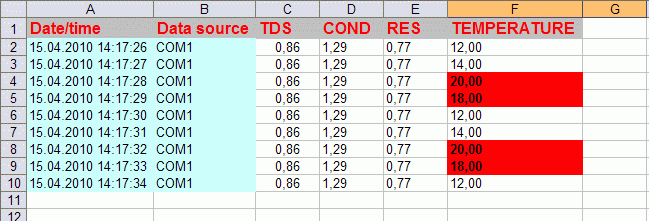
Each new record creates a new row. In Excel you can build charts for temperature over time, calculate minimum and maximum pressure per day, or add color rules to highlight humidity above a given threshold. The data appears automatically as long as the logger is running. So, at the end of a day, an operator can get a ready-to-use report with highligted alarms and can easily find and identify problems.
The plugin is also useful for test and measurement tasks, where detailed reports are required. For example, a serial test rig may output a summary line after each completed test:
Typical application areas include industrial automation, laboratory measurements, utilities, building automation, IT infrastructure monitoring, and any environment where serial or TCP/IP data must be stored in a spreadsheet format. The plugin helps you maintain consistent log structures, improve traceability, and simplify compliance reporting. It turns your loggers and Excel into a combined solution for acquisition and analysis of time-based data.
Download demo | PDF manual | Buy Now!
Read more about other plugins:
All plugins | SQL Database Professional | Cloud Database Professional | ODBC database | Direct Excel/OpenOpffice Calc/LibreOffice Calc Connection | Google Sheets Professional | Excel Export Professional | Send keystrokes | DDE Server | Local (desktop) database | Geo Export | Printer out | Web Server | HTTP POST GET & InfluxDB Export | SFTP Export | MQTT data receiving and publishing | OPC UA Server