
MQTT - publish real-time data plugin for Data Loggers
Latest version: 5.0.1 build 1126. November 28, 2025.
The MQTT data export module allows our data loggers (e.g., Advanced Serial Data Logger or Advanced TCP/IP Data Logger) to send data using the MQTT protocol. MQTT (Message Queue Telemetry Transport) is a lightweight messaging protocol that runs over TCP/IP and is widely used in industrial automation, IoT, and SCADA integration. With this module, you can publish parsed data as individual values or as JSON strings to one or more MQTT topics in real time.
The module reads variables prepared by the parser and then publishes these variables to an MQTT broker. Depending on the logger, it can receive serial, TCP, or OPC data. Then it can normalize and convert this data and then distribute the result to remote MQTT clients. This is useful if you need to move data from a plant floor network to a cloud platform such as an IoT hub, historian, or monitoring system that uses MQTT.
Typical use cases include sending sensor values from COM port devices to an MQTT broker, forwarding OPC tag values to an MQTT dashboard, or publishing TCP messages from industrial controllers to cloud services. The module supports different data types, including numeric values, strings, and timestamps. You define variables in the parser, and the module automatically maps these variables to MQTT topics or to fields inside JSON payloads. This design lets you keep your existing logging configuration and simply add MQTT as another export target with minimal changes.
Integration Example with Advanced Serial Data Logger
In this example, a device connected to COM1 sends measurements as ASCII strings every second. Each line has the following format:
Input line from COM1:
2025-01-02 08:00:00;Sensor01;23.7;45.2
Format:
DATE_TIME_STAMP;DeviceID;Temperature;Humidity
You configure the ASCII parser in Advanced Serial Data Logger to extract four variables:
- DATE_TIME_STAMP = 2025-01-02 08:00:00
- DEVICEID = Sensor01
- TEMPERATURE = 23.7
- HUMIDITY = 45.2
Then you enable the MQTT export module and set these options:
- Broker address: mqtt.example.local, port 1883
- Base topic: plant1/areaA
- Publish mode: JSON
- Variable list: DATE_TIME_STAMP, DEVICEID, TEMPERATURE, HUMIDITY
- QoS level: 1
The module generates the following outgoing MQTT message and publishes it to the topic "plant1/areaA/Sensor01":
{
  "timestamp": "2025-01-02 08:00:00",
  "device": "Sensor01",
  "temperature": 23.7,
  "humidity": 45.2
}
If you choose single value mode instead of JSON, the module will send separate messages:
Topic: plant1/areaA/Temperature
Payload: 23.7

Topic: plant1/areaA/Humidity
Payload: 45.2

Topic: plant1/areaA/DATE_TIME_STAMP
Payload: 2025-01-02 08:00:00
Any MQTT client subscribed to plant1/areaA/# will receive these values immediately. This can be a SCADA system, a web dashboard, a data historian, or a cloud function that reacts to changes and triggers alarms.
Key Features
- Publishes parsed logger data to MQTT brokers as single values or structured JSON messages.
- Works with all input sources supported by our data loggers.
- Flexible topic building with base topic and parser variable name combination for clear hierarchies.
- Optional list of parameters to control which values are published and what name they have.
- Support of secure connection with custom SSL certificates.
Summary
The MQTT data export module extends our data loggers with ability to send data to MQTT-based systems. It lets you repurpose existing data acquisition setups for modern IoT and cloud platforms without major changes to your infrastructure.
How to enable this plugin
The figure below shows how to select the plugin on the "Modules" page.
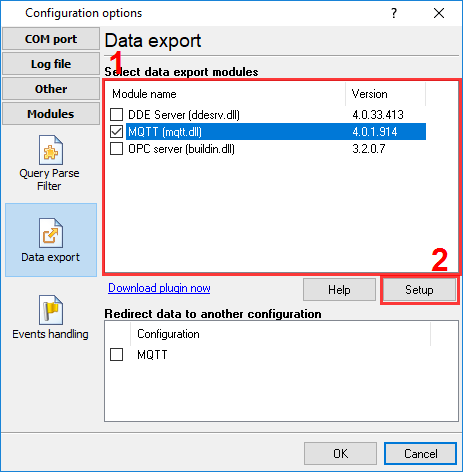
Fig.1. Selecting the plugin.
How to configure the plugin
The figure below shows how to configure the plugin to poll the device every 15 seconds. Of course, you may change the poll interval as you want.

Fig.2. Configuring the plugin.
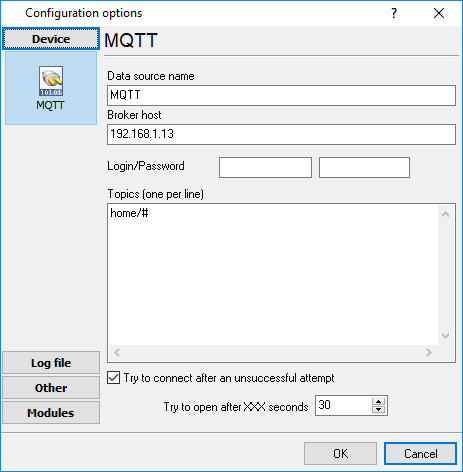
Fig.3. Configuring the plugin.
Read more about other plugins:
All plugins | SQL Database Professional | Cloud Database Professional | ODBC database | Direct Excel/OpenOpffice Calc/LibreOffice Calc Connection | Google Sheets Professional | Excel Export Professional | Send keystrokes | DDE Server | Local (desktop) database | Geo Export | Printer out | Web Server | HTTP POST GET & InfluxDB Export | SFTP Export | MQTT data receiving and publishing | OPC UA Server