
Google Sheets Professional plugin for Data Loggers
Latest version: 5.0.2 build 1002. November 28, 2025.
The Google Sheets Professional plugin exports real-time data from our data logger directly to Google Sheets using the Google API. It writes values to cloud storage without using local intermediate files. The module supports row and column writing, dynamic start cells, several filling modes, and template-based workbook creation. Also, it can automatically create a new workbook or worksheet by date and time.
This plugin is designed for users who need live monitoring, remote analysis, and web publishing of measurement and telemetry data. It reduces the need for manual export and supports buffering to minimize API calls. The module can preserve last write positions so logging continues from the previous cell after a restart.
Download demo | PDF manual | Buy Now!
Practical examples of use
Example 1: Live telemetry dashboard: A field device sends sensor readings every 10 seconds. Configure the binding to write the parser variable TEMPERATURE to column B starting at B2 and the variable HUMIDITY to column C starting at C2. Use the "Move" mode to keep the latest 100 records in the sheet so you can open the sheet in a browser and see live charts anywhere.
Example 2: Per-hour workbooks: Use the workbook prefix "SiteA_" and date template "YYYY-MM-DD-HH". The plugin will create new workbooks each hour, based on your selected template file. This prevents sheets from growing too large and organizes data by time intervals.
Example 3: Mixed orientation export: Write a set of parser variables into a single row so a single timestamp and multiple channel values are written horizontally. For alarm events, configure a separate binding to append rows in a dedicated "Alarms" worksheet.
Integration with Advanced Data Logger
Integration is straightforward. In Advanced Data Logger, open Modules → Data export, select Google Sheets Professional, and configure the Connection, Workbook, and Binding tabs. Example incoming data from a port and parsed by the ASCII parser might look like:
2025-01-02 08:00:00,DEVICE_ID=12,TEMPERATURE=23.5,HUMIDITY=45.2
2025-01-02 08:00:10,DEVICE_ID=12,TEMPERATURE=23.6,HUMIDITY=45.1
Binding configuration example:
- Parser item name: DATE_TIME_STAMP → write to cell A2.
- Parser item name: TEMPERATURE → write to cell B2.
- Parser item name: HUMIDITY → write to cell C2.
- Filling orientation: Vertically for each variable.
- Filling mode: "Move" with cells to fill count = 100.
Exported rows in Google Sheets after processing the two incoming lines above:
A1: DATE_TIME_STAMP               B1: TEMPERATURE  C1: HUMIDITY
A2: 2025-01-02 08:00:00   B2: 23.5         C2: 45.2
A3: 2025-01-02 08:00:10   B3: 23.6         C3: 45.1
Key features
- Real-time write to Google Sheets by rows or columns.
- Dynamic start cell with macro support.
- Multiple filling modes: Clear, Move, Reversed move, Stop, Next column/row.
- Automatic workbook and worksheet creation by date/time with templates.
- Buffered writes to minimize Google API calls and save positions across restarts.
- Customizable date, time, and number formats before export.
Summary: The Google Sheets Professional plugin improves our data loggers with Google Sheets for reliable, real-time cloud storage and visualization. It provides flexible binding, buffering, template support, and many write methods.
Download demo | PDF manual | Buy Now!
How to enable this plugin
The figure below shows how to select the plugin on the "Modules" page.
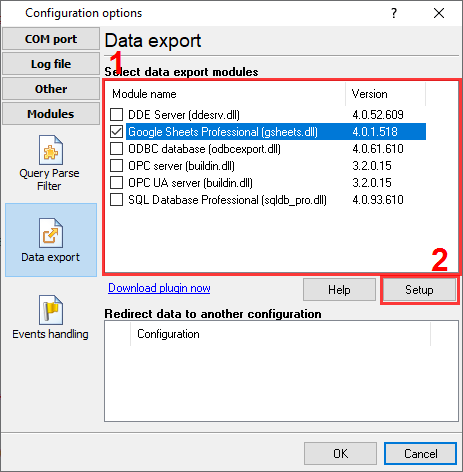
Fig.1. Selecting the plugin.
How to configure the plugin
The figure below shows how to configure the plugin. Please, look at the documentation for the full description of all settings.
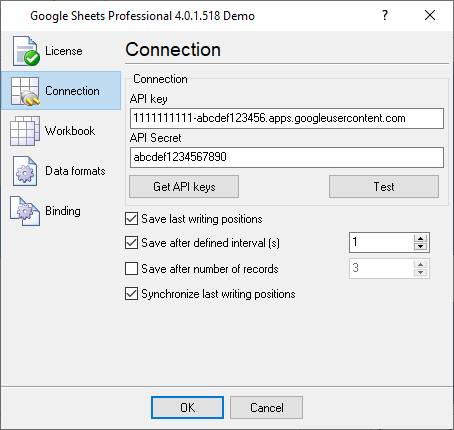
Fig.2. Configuring the plugin.
Read more about other plugins:
All plugins | SQL Database Professional | Cloud Database Professional | ODBC database | Direct Excel/OpenOpffice Calc/LibreOffice Calc Connection | Google Sheets Professional | Excel Export Professional | Send keystrokes | DDE Server | Local (desktop) database | Geo Export | Printer out | Web Server | HTTP POST GET & InfluxDB Export | SFTP Export | MQTT data receiving and publishing | OPC UA Server