
Avaya Communication Manager, Definity and G3 CDR formats
Advanced PBX Data Logger includes 17 parsers for Avaya Communication Manager, Definity, G3 and MultiVantage systems. This page gathers them in one place. For each system you will find how the call records reach the logger, the parser to select, and the 277 fields in total that these parsers extract for PBX Reports or a database. Of these, 1 over TCP client; the rest are identified by their record layout and can arrive over a serial port or a LAN connection. The settings apply to our logger; other call accounting software may expect a different configuration.
Systems on this page
- Avaya (59 Chars Output Format ACM 4.0) · Serial or TCP, 14 fields
- Avaya ACM3 (Custom User Format) · Serial or TCP, 11 fields
- Avaya Aura S8800 (Customized Output Format ACM 6.3) · Serial or TCP, 14 fields
- Avaya Communication Manager (Customized Output Format ACM 6.3) · TCP client, 14 fields
- Avaya (cost) · Serial or TCP, 10 fields
- Avaya (Customized Output Format ACM 4.0) · Serial or TCP, 15 fields
- Avaya (Customized Output Format ACM 6.0) · Serial or TCP, 18 fields
- Avaya (Enhanced Unformatted Output Format ACM 4.0) · Serial or TCP, 28 fields
- Avaya (Expanded Output Format ACM 4.0) · Serial or TCP, 25 fields
- Avaya G3 V12 (Unformatted ACM 3.x) · Serial or TCP, 22 fields
- Avaya G3 V12 (Unformatted Output Format) · Serial or TCP, 22 fields
- Avaya G3 V12 · Serial or TCP, 8 fields
- Avaya G3 V9 · Serial or TCP, 9 fields
- Avaya MultiVantage (Unformatted Output Format ACM 4.0) · Serial or TCP, 14 fields
- Avaya (Printer Output Format ACM 4.0) · Serial or TCP, 16 fields
- Avaya (Unformatted Output Format ACM 4.0) · Serial or TCP, 25 fields
- Lucent G3 · Serial or TCP, 12 fields
Connecting the logger
Add a data source in PBX Data Logger that matches the interface named in each section: RS232 for a serial SMDR port, TCP client when the PBX accepts connections, TCP server when the PBX pushes records to the logger, or FTP for systems that write CDR files. Then open Modules → Query Parse Filter → Data query, click Setup and select the parser named in the section. The general steps are shown on the SMDR listener page; every other supported system is listed on the supported PBX index.
Settings from the manufacturer's documentation
Taken from Avaya ACM4 - All CDR formats, Avaya ACM6 - Condition codes, Veramark - Connectivity Guide. Values are those stated in the documentation; confirm them against your firmware release.
| Setting | Documented value |
|---|---|
| Use Legacy CDR Formats default | y (legacy CM 3.x formats) by default; set to n to get the Communication Manager 4.0 record formats |
| EIA Device Bit Rate (serial CDR port baud, DEFINITY SI) | 300, 1200, 2400, 4800, or 9600 |
| serial parameters (Veramark example for DEFINITY G3/ProLogix direct connect) | 9600 baud, 8 data bits, no parity, 1 stop bit, DTR/RTS flow control |
| CDR Date Format field options | month/day or day/month |
| Primary Output Endpoint values | eia (serial port, not valid on DEFINITY R), a data-module extension, or CDR1/CDR2 when the link is a TCP/IP entry on the IP Services screen |
| IP-services remote CDR port (Veramark worked example) | 9000 |
Switching SMDR output on, as documented
- Type change system-parameters cdr and press Enter to open the CDR System Parameters screen.
- Set Primary Output Format to customized, or to a standard format (59-char, expanded, unformatted, printer, etc.), and set Primary Output Endpoint to CDR1/CDR2 for a TCP/IP link.
- Add node names and IP addresses for the switch and the call-accounting PC on the node-names ip form before configuring IP services.
- On the ip-services form add a CDR1 service type with local/remote node names and the remote port, then set Reliable Protocol as required on page 3.
Record format notes
- CDR sends a separate date-only record to the output device once a day at midnight (or when the device first connects); this is distinct from each call's own CDR record.
- Condition code identifies the call type on each record, e.g. 0=intraswitch call, 7/8/9=extremely long call or high message-count TSC, I=outgoing call, G=AAR/ARS-routed call, C=conference call.
- If two condition codes would apply to the same call record, a documented override matrix decides which single code is actually recorded.
Avaya (59 Chars Output Format ACM 4.0)
Parser: Avaya (59 Chars Output Format ACM 4.0)
Connection: Serial printer port or LAN, whichever the system uses for SMDR output. The record layout identifies the format.
Fields extracted: 14
Avaya Communication Manager 4.X
1. Change node-name ip and add a new entry that hosts our PBX Data Logger application.
2. Change ip-services add a new entry of CDR1, and fill out the rest of the values. If you go to page three, you may need to set the "Secure" or "Reliable" option to N.
3. Change system cdr and setup the link how you want it outputted.
4. Disable the switch for "Legacy" output.
5. Our software expects date in MMDDYY format if nothing else is specified explicitly.
Our software does not support Reliable Session Protocol. You need to select another protocol type in your PBX
Settings from the manufacturer's documentation
Taken from Avaya ACM4 - All CDR formats. Values are those stated in the documentation; confirm them against your firmware release.
Record format notes
- The Communication Manager 4.0+ standard '59 character' record is fixed-width, 61-63 bytes: hours/minutes, duration, condition code, access code dialed/used, dialed number, calling number, account code, FRL, IXC, incoming/outgoing circuit ID, then CR/LF and null padding.
- Byte layout ends: position 59 carriage return, 60 line feed, 61-63 null padding.
Data items: Avaya (59 Chars Output Format ACM 4.0)
| Description | Data type | Column name |
|---|---|---|
| Call date and time | datetime | CALL_TIME |
| Call duration (s) | integer | CALL_DURATION_S |
| Condition code | string | CALL_TYPE |
| Direction | string | DIRECTION |
| Access code dialed | string | FLAG1 |
| Access code used | string | FLAG2 |
| Dialed phone | string | DIALED_PHONE |
| Caller phone | string | CALLER_PHONE |
| Extension | string | EXT |
| Account | string | ACC |
| FRL | string | FLAG4 |
| IXC | string | FLAG5 |
| Incoming circuit ID | string | CIRCUIT_ID_IN |
| Outgoing circuit ID | string | CIRCUIT_ID_OUT |
Sample record
As delivered by the system; phone numbers, names and public addresses are masked.
032907 0032 3012 051                          53201           43301 00147 1 9
032907 0032 3012 007                          53201           52001 00003 0 9
032907 0032 3012 006                          53201           52001 00004 0 9
Avaya ACM3 (Custom User Format)
Parser: Avaya ACM3 (Custom User Format)
Connection: Serial printer port or LAN, whichever the system uses for SMDR output. The record layout identifies the format.
Fields extracted: 11
Data items: Avaya ACM3 (Custom User Format)
| Description | Data type | Column name |
|---|---|---|
| Call time | datetime | CALL_TIME |
| Call duration (s) | integer | CALL_DURATION_S |
| Condition code | string | CALL_TYPE |
| Direction | string | DIRECTION |
| Dialed phone | string | DIALED_PHONE |
| Caller phone | string | CALLER_PHONE |
| Extension | string | EXT |
| Trunk | string | TRUNK |
| Member | string | FLAG1 |
| Account | string | ACC |
| Auth code | string | AUTH |
Avaya Aura S8800 (Customized Output Format ACM 6.3)
Parser: Avaya Aura S8800 (Customized Output Format ACM 6.3)
Connection: Serial printer port or LAN, whichever the system uses for SMDR output. The record layout identifies the format.
Fields extracted: 14
CDR customized format
display system-parameters cdr                                   Page   2 of   2
                            CDR SYSTEM PARAMETERS

     Data Item - Length         Data Item - Length         Data Item - Length
 1: date             - 6   17: attd-console     - 2   33:                  -
 2: time             - 4   18: auth-code        - 13  34:                  -
 3: sec-dur          - 5   19: return           - 1   35:                  -
 4: cond-code        - 1   20: line-feed        - 1   36:                  -
 5: code-dial        - 4   21:                  -     37:                  -
 6: code-used        - 4   22:                  -     38:                  -
 7: dialed-num       - 23  23:                  -     39:                  -
 8: clg-num/in-tac   - 15  24:                  -     40:                  -
 9: acct-code        - 15  25:                  -     41:                  -
10: ppm              - 5   26:                  -     42:                  -
11: in-crt-id        - 3   27:                  -     43:                  -
12: out-crt-id       - 3   28:                  -     44:                  -
13: isdn-cc          - 11  29:                  -     45:                  -
14: feat-flag        - 1   30:                  -     46:                  -
15: frl              - 1   31:                  -     47:                  -
16: clg-pty-cat      - 2   32:                  -     48:                  -

                              Record length = 120
Date format
The parser expects date in DDMMYY format (day/month/year).
Settings from the manufacturer's documentation
Taken from Avaya ACM4 - All CDR formats. Values are those stated in the documentation; confirm them against your firmware release.
| Setting | Documented value |
|---|---|
| customized CDR date field length | must be set to 6 |
| minimum data items for a customized CDR record | at least 3 fields; the record must end with line-feed then return, in that order |
Switching SMDR output on, as documented
- On page 2 of system-parameters cdr, list the chosen data items (from the Valid data item entries table) in the order they should appear in the customized record.
Record format notes
- The data-item names shown in the page's CDR SYSTEM PARAMETERS figure (date, sec-dur, cond-code, code-dial, code-used, dialed-num, clg-num/in-tac, acct-code, ppm, in-crt-id, out-crt-id, isdn-cc, feat-flag, frl, clg-pty-cat, attd-console, auth-code) are all documented valid customized CDR data items.
- The Record Length shown on the CDR System Parameters screen is a display-only field that auto-sums the Length of every configured data item, matching the page's 'Record length = 120'.
Data items: Avaya Aura S8800 (Customized Output Format ACM 6.3)
| Description | Data type | Column name |
|---|---|---|
| Call time | datetime | CALL_TIME |
| Call duration (s) | integer | CALL_DURATION_S |
| Call duration | datetime | CALL_DURATION |
| Condition code | string | CALL_TYPE |
| Direction | string | DIRECTION |
| Incoming circuit ID | string | FLAG4 |
| Access code used | string | FLAG1 |
| Outgoing circuit ID | string | FLAG5 |
| Incoming trunk code | string | TRUNK |
| Dialed phone | string | DIALED_PHONE |
| Caller phone | string | CALLER_PHONE |
| Extension | string | EXT |
| Account code | string | ACC |
| Auth code | string | AUTH |
Sample record
As delivered by the system; phone numbers, names and public addresses are masked.
290xxxxxxxxxxxxx     799                   6020           6738                   0   100          040
290xxxxxxxxxxxxx                           2757           2939
290xxxxxxxxxxxxx                           6762           6481                   0032             000 7
Avaya Communication Manager (Customized Output Format ACM 6.3)
Parser: Avaya Communication Manager (Customized Output Format ACM 6.3)
Connection: LAN. The PBX accepts a connection on TCP port 5555; the logger connects to the PBX IP address.
Fields extracted: 14
Configuring ACM
System parameters
- Type change system-parameters cdr. Press Enter.
- The CDR System Parameters screen appears.
- In the Primary Output Format field, select customized.
- In the CDR Date Format field, select day/month.
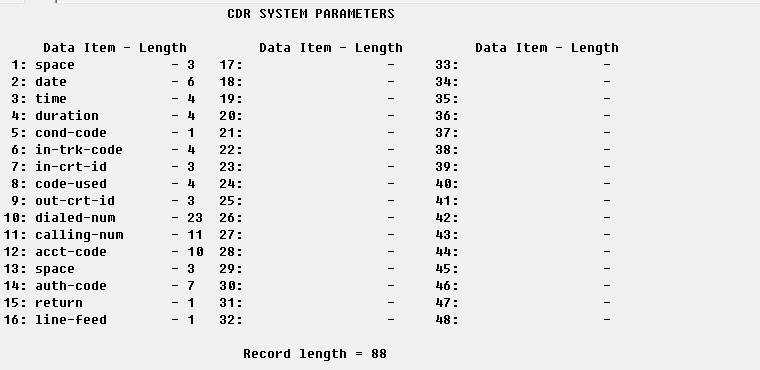
- On the page #2 define CDR fields descriptions as on the figure above.
IP services - Client mode (Preferred)
The PBX can also work in the TCP client mode. You may use this mode instead of the TCP server mode.
- Type list node-names all.
- Press Enter.
- Add a new node with the following settings.
- Type - IP
- Name - pbxlogger
- IP Address - 192.168.10.33 (this is the IP address where Advanced PBX Data Logger is installed. The computer with the logger must have a static IP address)
- Type display ip-services.
- Press Enter.
- Verify or change the settings for the CDR1 service.
- Enabled - Y.
- Reliable Protocol - N.
- Local port - 0.
- Remote node - pbxlogger.
- Remote port - 5555.
IP services - Server mode
- Type display ip-services.
- Press Enter.
- Verify the settings for the CDR1 service.
- Enabled - Y.
- Reliable Protocol - N.
- The following suggested settings instruct the PBX to work in the TCP Server mode.
- Local port - 5555 (you may use any other port number above 1024. But you must specify the same port number in Advanced PBX Data Logger).
- Remote node - Any.
- Remote port - 0.
Avaya Communication Manager (ACM) 6.3 and higher. Customized format.
This parser is designed for the following customized format.
Date format
The parser expects date in MMDDYY format (month/day/year).
Settings from the manufacturer's documentation
Taken from Avaya ACM4 - All CDR formats, Veramark - Connectivity Guide. Values are those stated in the documentation; confirm them against your firmware release.
| Setting | Documented value |
|---|---|
| IP Services CDR1 remote port (manual's own worked example) | 9000, not 5555 |
| switch software level required for IP/RSP CDR delivery | MultiVantage or Communication Manager release 11 load 110+, or release 10 load 43+ on other systems |
Switching SMDR output on, as documented
- On ip-interfaces, enable a C-LAN (or Processor Ethernet) board with its slot, node name, subnet mask and gateway address before setting up ip-services.
- Set Primary Output Format to unformatted (or customized) and Primary Output Endpoint to CDR1 on system-parameters cdr; no other entries are required.
Data items: Avaya Communication Manager (Customized Output Format ACM 6.3)
| Description | Data type | Column name |
|---|---|---|
| Call time | datetime | CALL_TIME |
| Call duration (s) | integer | CALL_DURATION_S |
| Call duration | datetime | CALL_DURATION |
| Condition code | string | CALL_TYPE |
| Direction | string | DIRECTION |
| Incoming trunk code | string | TRUNK |
| Incoming circuit ID | string | FLAG4 |
| Access code used | string | FLAG1 |
| Outgoing circuit ID | string | FLAG5 |
| Dialed phone | string | DIALED_PHONE |
| Caller phone | string | CALLER_PHONE |
| Extension | string | EXT |
| Account code | string | ACC |
| Auth code | string | AUTH |
Sample record
As delivered by the system; phone numbers, names and public addresses are masked.
   092xxxxxxxxxxxx       602xxxx             819xxxxxxx       4132
   092xxxxxxxxxxxxxxxxxxx                          1575 450xxxxxxx
   092xxxxxxxxxxxx       602xxxx             514xxxxxxx       6230
Avaya (cost)
Parser: Avaya (cost)
Connection: Serial printer port or LAN, whichever the system uses for SMDR output. The record layout identifies the format.
Fields extracted: 10
Avaya Communication Manager 4.X
1. Change node-name ip and add a new entry that hosts our PBX Data Logger application.
2. Change ip-services add a new entry of CDR1, and fill out the rest of the values. If you go to page three, you may need to set the "Secure" or "Reliable" option to N.
3. Change system cdr and setup the link how you want it outputted.
4. Disable the switch for "Legacy" output.
5. Our software expects date in MMDDYY format if nothing else is specified explicitly.
Our software does not support Reliable Session Protocol. You need to select another protocol type in your PBX
Data items: Avaya (cost)
| Description | Data type | Column name |
|---|---|---|
| Code | string | FLAG1 |
| Direction | string | DIRECTION |
| Line | string | EXT |
| Station | string | FLAG2 |
| Phone | string | DIALED_PHONE |
| Call time | datetime | CALL_TIME |
| Call duration | datetime | CALL_DURATION |
| Call duration (s) | integer | CALL_DURATION_S |
| Cost | float | COST |
| Account | string | ACC |
Sample record
As delivered by the system; phone numbers, names and public addresses are masked.
IN  2500  94130                              14:40 00:01:08 $00.00             *

IN  2507  94130                              14:42 00:00:16 $00.00             *

TLC 1036  941xx xxx-xxxx                     14:39 00:03:44 $00.00
Avaya (Customized Output Format ACM 4.0)
Parser: Avaya (Customized Output Format ACM 4.0)
Connection: Serial printer port or LAN, whichever the system uses for SMDR output. The record layout identifies the format.
Fields extracted: 15
Avaya Communication Manager 4.X
1. Change node-name ip and add a new entry that hosts our PBX Data Logger application.
2. Change ip-services add a new entry of CDR1, and fill out the rest of the values. If you go to page three, you may need to set the "Secure" or "Reliable" option to N.
3. Change system cdr and setup the link how you want it outputted.
4. Disable the switch for "Legacy" output.
5. Our software expects date in MMDDYY format if nothing else is specified explicitly.
Our software does not support Reliable Session Protocol. You need to select another protocol type in your PBX
Avaya Call Manager v4+. Customized format.
This parser is designed for the following customized format.

Date format
The parser expects date in MMDDYY format (month/day/year).
Notes
In the Avaya Communication Manager (ACM) world, a device on the PBX needs to be specified that the CDR stream towards the logger goes out on. This can be a 'CLAN' card (a dedicated Avaya proprietary circuit back for network connectivity) or, in newer versions of Avaya Communication Manager, it can be 'Processor Ethernet' (the network interface of the code CM server).
As it turns out, in ACM 5.2.1 SP15 and to a certain level also in ACM 6.0.1. SP5 (these were the only versions we tested it on), when using Processor Ethernet for the CDR stream, it is not stable. ACM 5.2.1 dropped it a log (every 30 or so minutes) while ACM 6.0.1 dropped it about once a day.
Moving the CDR stream to a CLAN card fixed it. In ACM 6.2, it seems to be running stable on Processor Ethernet. It seems Avaya made some improvements between ACM 5.2.1, ACM 6.0.1 and finally resolved all issue in ACM 6.2.
Data items: Avaya (Customized Output Format ACM 4.0)
| Description | Data type | Column name |
|---|---|---|
| Call time | datetime | CALL_TIME |
| Call duration (s) | integer | CALL_DURATION_S |
| Condition code | string | CALL_TYPE |
| Direction | string | DIRECTION |
| Access code used | string | FLAG1 |
| Access code dialed | string | FLAG2 |
| Dialed phone | string | DIALED_PHONE |
| Caller phone | string | CALLER_PHONE |
| Extension | string | EXT |
| Auth code | string | AUTH |
| Incoming circuit ID | string | FLAG4 |
| Outgoing circuit ID | string | FLAG5 |
| Account code | string | ACC |
| Incoming trunk code | string | TRUNK |
| FRL | string | FLAG6 |
Avaya (Customized Output Format ACM 6.0)
Parser: Avaya (Customized Output Format ACM 6.0)
Connection: Serial printer port or LAN, whichever the system uses for SMDR output. The record layout identifies the format.
Fields extracted: 18
Avaya Communication Manager 4.X
1. Change node-name ip and add a new entry that hosts our PBX Data Logger application.
2. Change ip-services add a new entry of CDR1, and fill out the rest of the values. If you go to page three, you may need to set the "Secure" or "Reliable" option to N.
3. Change system cdr and setup the link how you want it outputted.
4. Disable the switch for "Legacy" output.
5. Our software expects date in MMDDYY format if nothing else is specified explicitly.
Our software does not support Reliable Session Protocol. You need to select another protocol type in your PBX
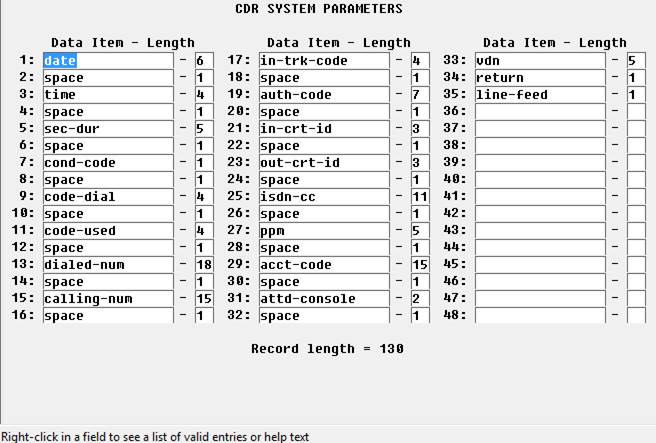
Avaya Call Manager (CM) 6 and higher. Customized format.
This parser is designed for the following customized format.
Data items: Avaya (Customized Output Format ACM 6.0)
| Description | Data type | Column name |
|---|---|---|
| Call time | datetime | CALL_TIME |
| Call duration (s) | integer | CALL_DURATION_S |
| Condition code | string | CALL_TYPE |
| Direction | string | DIRECTION |
| Access code used | string | FLAG1 |
| Access code dialed | string | FLAG2 |
| Dialed phone | string | DIALED_PHONE |
| Caller phone | string | CALLER_PHONE |
| Extension | string | EXT |
| Incoming trunk code | string | TRUNK |
| Auth code | string | AUTH |
| Incoming circuit ID | string | FLAG4 |
| Outgoing circuit ID | string | FLAG5 |
| ISDN | string | FLAG7 |
| Periodic Pulse Metering | string | PPM |
| Account code | string | ACC |
| Attendant console | string | FLAG6 |
| VDN extension number | string | VDN |
Avaya (Enhanced Unformatted Output Format ACM 4.0)
Parser: Avaya (Enhanced Unformatted Output Format ACM 4.0)
Connection: Serial printer port or LAN, whichever the system uses for SMDR output. The record layout identifies the format.
Fields extracted: 28
Avaya Communication Manager 4.X
1. Change node-name ip and add a new entry that hosts our PBX Data Logger application.
2. Change ip-services add a new entry of CDR1, and fill out the rest of the values. If you go to page three, you may need to set the "Secure" or "Reliable" option to N.
3. Change system cdr and setup the link how you want it outputted.
4. Disable the switch for "Legacy" output.
5. Our software expects date in MMDDYY format if nothing else is specified explicitly.
Our software does not support Reliable Session Protocol. You need to select another protocol type in your PBX
Settings from the manufacturer's documentation
Taken from Avaya ACM4 - All CDR formats. Values are those stated in the documentation; confirm them against your firmware release.
Record format notes
- The 'enhanced unformatted' format extends the plain 'unformatted' layout to 119-123 bytes by adding Bandwidth and ISDN CC/PPM count fields after the TSC flag.
- Positions 104-114 hold ISDN CC digits 1-6, then digits 7-11 or a PPM (periodic pulse metering) count 1-5, before reserved bytes and CR/LF.
Data items: Avaya (Enhanced Unformatted Output Format ACM 4.0)
| Description | Data type | Column name |
|---|---|---|
| Call date and time | datetime | CALL_TIME |
| Call duration (s) | integer | CALL_DURATION_S |
| Condition code | string | CALL_TYPE |
| Direction | string | DIRECTION |
| Access code dialed | string | FLAG1 |
| Access code used | string | FLAG2 |
| Dialed phone | string | DIALED_PHONE |
| Caller phone | string | CALLER_PHONE |
| Extension | string | EXT |
| Account | string | ACC |
| Auth code | string | AUTH |
| FRL | string | FLAG4 |
| Incoming circuit ID | string | CIRCUIT_ID_IN |
| Outgoing circuit ID | string | CIRCUIT_ID_OUT |
| Feature flag | string | FLAG5 |
| Attendant console | string | FLAG6 |
| Incoming TAC | string | FLAG7 |
| Node number | string | FLAG3 |
| ISDN NSV | string | ISDN_NSV |
| IXC | string | IXC |
| Bearer capability class | string | BCC |
| Message-Associated User-to-User Signaling | string | MA_UUI |
| Resource flag | string | RESOURCE_FLAG |
| Packet count | string | PACKET_COUNT |
| Temporary-signaling connection | string | TSC |
| Bandwidth | string | BANDWIDTH |
| ISDN CC | string | ISDN_CC |
| ISDN CC 2 | string | ISDN_CC2 |
Sample record
As delivered by the system; phone numbers, names and public addresses are masked.
092xxxxxx 878xxxxxxxxxxx 7 13 0 182 0 000
092xxxxxx 516xxxxxxxxxxx 7 03 0 182 0 000
092xxxxxx 9 182 503xxxxxxx 7707 5 454 0 000
Avaya (Expanded Output Format ACM 4.0)
Parser: Avaya (Expanded Output Format ACM 4.0)
Connection: Serial printer port or LAN, whichever the system uses for SMDR output. The record layout identifies the format.
Fields extracted: 25
Avaya Communication Manager 4.X
1. Change node-name ip and add a new entry that hosts our PBX Data Logger application.
2. Change ip-services add a new entry of CDR1, and fill out the rest of the values. If you go to page three, you may need to set the "Secure" or "Reliable" option to N.
3. Change system cdr and setup the link how you want it outputted.
4. Disable the switch for "Legacy" output.
5. Our software expects date in MMDDYY format if nothing else is specified explicitly.
Our software does not support Reliable Session Protocol. You need to select another protocol type in your PBX
Settings from the manufacturer's documentation
Taken from Avaya ACM4 - All CDR formats. Values are those stated in the documentation; confirm them against your firmware release.
Record format notes
- The 'expanded' standard format is a space-delimited fixed layout, 137-139 bytes, inserting a literal space between almost every field (unlike the compact 'unformatted' layout).
- Dialed number occupies positions 23-37 (15 chars) and calling number 39-48 (10 chars) in the expanded format, each separated by a space byte.
Data items: Avaya (Expanded Output Format ACM 4.0)
| Description | Data type | Column name |
|---|---|---|
| Call date and time | datetime | CALL_TIME |
| Call duration (s) | integer | CALL_DURATION_S |
| Condition code | string | CALL_TYPE |
| Direction | string | DIRECTION |
| Access code dialed | string | FLAG1 |
| Access code used | string | FLAG2 |
| Dialed phone | string | DIALED_PHONE |
| Caller phone | string | CALLER_PHONE |
| Extension | string | EXT |
| Account | string | ACC |
| Auth code | string | AUTH |
| FRL | string | FLAG4 |
| Incoming circuit ID | string | CIRCUIT_ID_IN |
| Outgoing circuit ID | string | CIRCUIT_ID_OUT |
| Feature flag | string | FLAG5 |
| Attendant console | string | FLAG6 |
| Incoming TAC | string | FLAG7 |
| Node number | string | FLAG3 |
| INS | string | INS |
| IXC | string | IXC |
| Bearer capability class | string | BCC |
| Message-Associated User-to-User Signaling | string | MA_UUI |
| Resource flag | string | RESOURCE_FLAG |
| Packet count | string | PACKET_COUNT |
| Temporary-signaling connection | string | TSC |
Sample record
As delivered by the system; phone numbers, names and public addresses are masked.
   085xxxxxx   9C102  044xxxxxxxxxx     10511                        5   0114       0      000
   093xxxxxx   9C102        684xxxx     10010                        5   0124       0      000
   100xxxxxx    C101           7006     10511                        5   0024       0      000
Avaya G3 V12 (Unformatted ACM 3.x)
Parser: Avaya G3 V12 (Unformatted ACM 3.x)
Connection: Serial printer port or LAN, whichever the system uses for SMDR output. The record layout identifies the format.
Fields extracted: 22
Settings from the manufacturer's documentation
Taken from Avaya ACM4 - All CDR formats. Values are those stated in the documentation; confirm them against your firmware release.
Record format notes
- The legacy Communication Manager 3.x 'unformatted' record is a fixed 97-105 byte layout, four bytes shorter than the CM 4.0 unformatted layout because of a smaller node-related field; otherwise the same field order (time, duration, condition code, access codes, dialed/calling number, account/auth code, FRL, circuit IDs, feature flag, attendant console, TAC, node number, INS, IXC, BCC, MA-UUI, resource flag, packet count, TSC flag).
Data items: Avaya G3 V12 (Unformatted ACM 3.x)
| Description | Data type | Column name |
|---|---|---|
| Call date and time | datetime | CALL_TIME |
| Call duration (s) | integer | CALL_DURATION_S |
| Condition code | string | CALL_TYPE |
| Access code dialed | string | FLAG1 |
| Access code used | string | FLAG2 |
| Dialed phone | string | DIALED_PHONE |
| Caller phone | string | CALLER_PHONE |
| Extension | string | EXT |
| Account | string | ACC |
| Auth code | string | AUTH |
| FRL | string | FLAG4 |
| Incoming circuit ID | string | CIRCUIT_ID_IN |
| Outgoing circuit ID | string | CIRCUIT_ID_OUT |
| Feature flag | string | FLAG5 |
| Incoming TAC | string | FLAG6 |
| INS | string | INS |
| IXC | string | IXC |
| BCC | string | BCC |
| MA-UUI | string | MAUUI |
| Resource flag | string | RESOURCE_FLAG |
| Packet count | string | PACKET_COUNT |
| TSC flag | string | TSC_FLAG |
Sample record
As delivered by the system; phone numbers, names and public addresses are masked.
071809 1405 3501 157      991xxxxxxx          53529           42367 00229 1 9
071809 1405 3701 059      998xxxxxxx          53751           53751 00015 2 9
Avaya G3 V12 (Unformatted Output Format)
Parser: Avaya G3 V12 (Unformatted Output Format)
Connection: Serial printer port or LAN, whichever the system uses for SMDR output. The record layout identifies the format.
Fields extracted: 22
Data items: Avaya G3 V12 (Unformatted Output Format)
| Description | Data type | Column name |
|---|---|---|
| Call date and time | datetime | CALL_TIME |
| Call duration (s) | integer | CALL_DURATION_S |
| Condition code | string | CALL_TYPE |
| Access code dialed | string | FLAG1 |
| Access code used | string | FLAG2 |
| Dialed phone | string | DIALED_PHONE |
| Caller phone | string | CALLER_PHONE |
| Extension | string | EXT |
| Account | string | ACC |
| Auth code | string | AUTH |
| FRL | string | FLAG4 |
| Incoming circuit ID | string | CIRCUIT_ID_IN |
| Outgoing circuit ID | string | CIRCUIT_ID_OUT |
| Feature flag | string | FLAG5 |
| Incoming TAC | string | FLAG6 |
| INS | string | INS |
| IXC | string | IXC |
| BCC | string | BCC |
| MA-UUI | string | MAUUI |
| Resource flag | string | RESOURCE_FLAG |
| Packet count | string | PACKET_COUNT |
| TSC flag | string | TSC_FLAG |
Avaya G3 V12
Parser: Avaya G3 V12
Connection: Serial printer port or LAN, whichever the system uses for SMDR output. The record layout identifies the format.
Fields extracted: 8
Data items: Avaya G3 V12
| Description | Data type | Column name |
|---|---|---|
| Call time | datetime | CALL_TIME |
| Call duration | datetime | CALL_DURATION |
| Call duration (s) | integer | CALL_DURATION_S |
| Direction | string | DIRECTION |
| Direction | string | DIALED_PHONE |
| Caller phone | string | CALLER_PHONE |
| Extension | string | EXT |
| CO | string | TRUNK |
Avaya G3 V9
Parser: Avaya G3 V9
Connection: Serial printer port or LAN, whichever the system uses for SMDR output. The record layout identifies the format.
Fields extracted: 9
Data items: Avaya G3 V9
| Description | Data type | Column name |
|---|---|---|
| Call time | datetime | CALL_TIME |
| Call duration | datetime | CALL_DURATION |
| Call duration (s) | integer | CALL_DURATION_S |
| Direction | string | DIRECTION |
| Direction | string | DIALED_PHONE |
| Caller phone | string | CALLER_PHONE |
| Extension | string | EXT |
| CO | string | TRUNK |
| Account | string | ACC |
Sample record
As delivered by the system; phone numbers, names and public addresses are masked.
112605 0007 0002              944xxxxxxx 030 305            5041
112605 0032 0005                    5041              802xxxxxxx         016  305
112605 0034 0005                    5252              802xxxxxxx         017  305
Avaya MultiVantage (Unformatted Output Format ACM 4.0)
Parser: Avaya MultiVantage (Unformatted Output Format ACM 4.0)
Connection: Serial printer port or LAN, whichever the system uses for SMDR output. The record layout identifies the format.
Fields extracted: 14
Data items: Avaya MultiVantage (Unformatted Output Format ACM 4.0)
| Description | Data type | Column name |
|---|---|---|
| Call time | datetime | CALL_TIME |
| Call duration (s) | integer | CALL_DURATION_S |
| Condition code | string | CALL_TYPE |
| Direction | string | DIRECTION |
| Access code dialed | string | FLAG1 |
| Access code used | string | FLAG2 |
| Dialed phone | string | DIALED_PHONE |
| Caller phone | string | CALLER_PHONE |
| Extension | string | EXT |
| Account | string | ACC |
| Auth code | string | AUTH |
| FRL | string | FLAG4 |
| Feature flag | string | FLAG5 |
| Incoming TAC | string | FLAG6 |
Sample record
As delivered by the system; phone numbers, names and public addresses are masked.
68-70 Incoming circuit ID (hundreds, tens, units)
71-73 Outgoing circuit ID (hundreds, tens, units)
75-78 Attendant console
Avaya (Printer Output Format ACM 4.0)
Parser: Avaya (Printer Output Format ACM 4.0)
Connection: Serial printer port or LAN, whichever the system uses for SMDR output. The record layout identifies the format.
Fields extracted: 16
Avaya Communication Manager 4.X
1. Change node-name ip and add a new entry that hosts our PBX Data Logger application.
2. Change ip-services add a new entry of CDR1, and fill out the rest of the values. If you go to page three, you may need to set the "Secure" or "Reliable" option to N.
3. Change system cdr and setup the link how you want it outputted.
4. Disable the switch for "Legacy" output.
5. Our software expects date in MMDDYY format if nothing else is specified explicitly.
Our software does not support Reliable Session Protocol. You need to select another protocol type in your PBX
Settings from the manufacturer's documentation
Taken from Avaya ACM4 - All CDR formats. Values are those stated in the documentation; confirm them against your firmware release.
Record format notes
- The 'printer' standard format is an 82-84 byte space-delimited layout intended for a serial printer/TTY rather than for a database; it ends at feature flag, CR, LF with no null padding, unlike unformatted/59-char/expanded.
Data items: Avaya (Printer Output Format ACM 4.0)
| Description | Data type | Column name |
|---|---|---|
| Call date and time | datetime | CALL_TIME |
| Call duration (s) | integer | CALL_DURATION_S |
| Condition code | string | CALL_TYPE |
| Direction | string | DIRECTION |
| Access code dialed | string | FLAG1 |
| Access code used | string | FLAG2 |
| Dialed phone | string | DIALED_PHONE |
| Caller phone | string | CALLER_PHONE |
| Extension | string | EXT |
| Account | string | ACC |
| Auth code | string | AUTH |
| FRL | string | FLAG4 |
| IXC | string | FLAG5 |
| Incoming circuit ID | string | CIRCUIT_ID_IN |
| Outgoing circuit ID | string | CIRCUIT_ID_OUT |
| Feature flag | string | FLAG6 |
Avaya (Unformatted Output Format ACM 4.0)
Parser: Avaya (Unformatted Output Format ACM 4.0)
Connection: Serial printer port or LAN, whichever the system uses for SMDR output. The record layout identifies the format.
Fields extracted: 25
Avaya Communication Manager 4.X
1. Change node-name ip and add a new entry that hosts our PBX Data Logger application.
2. Change ip-services add a new entry of CDR1, and fill out the rest of the values. If you go to page three, you may need to set the "Secure" or "Reliable" option to N.
3. Change system cdr and setup the link how you want it outputted.
4. Disable the switch for "Legacy" output.
5. Our software expects date in MMDDYY format if nothing else is specified explicitly.
Our software does not support Reliable Session Protocol. You need to select another protocol type in your PBX
Settings from the manufacturer's documentation
Taken from Avaya ACM4 - All CDR formats. Values are those stated in the documentation; confirm them against your firmware release.
Record format notes
- The CM 4.0+ standard 'unformatted' record is a fixed 105-109 byte layout: time, duration, condition code, access codes dialed/used, dialed number, calling number, account code, authorization code, FRL, in/out circuit ID, feature flag, attendant console, incoming TAC, node number, INS, IXC, BCC, MA-UUI, resource flag, packet count, TSC flag, reserved, CR/LF, null.
- Field positions 43-57 hold the account code and 58-64 the authorization code in this format.
Data items: Avaya (Unformatted Output Format ACM 4.0)
| Description | Data type | Column name |
|---|---|---|
| Call date and time | datetime | CALL_TIME |
| Call duration (s) | integer | CALL_DURATION_S |
| Condition code | string | CALL_TYPE |
| Direction | string | DIRECTION |
| Access code dialed | string | FLAG1 |
| Access code used | string | FLAG2 |
| Dialed phone | string | DIALED_PHONE |
| Caller phone | string | CALLER_PHONE |
| Extension | string | EXT |
| Account | string | ACC |
| Auth code | string | AUTH |
| FRL | string | FLAG4 |
| Incoming circuit ID | string | CIRCUIT_ID_IN |
| Outgoing circuit ID | string | CIRCUIT_ID_OUT |
| Feature flag | string | FLAG5 |
| Attendant console | string | FLAG6 |
| Incoming TAC | string | FLAG7 |
| Node number | string | FLAG3 |
| INS | string | INS |
| IXC | string | IXC |
| Bearer capability class | string | BCC |
| Message-Associated User-to-User Signaling | string | MA_UUI |
| Resource flag | string | RESOURCE_FLAG |
| Packet count | string | PACKET_COUNT |
| Temporary-signaling connection | string | TSC |
Lucent G3
Parser: Lucent G3
Connection: Serial printer port or LAN, whichever the system uses for SMDR output. The record layout identifies the format.
Fields extracted: 12
Data items: Lucent G3
| Description | Data type | Column name |
|---|---|---|
| Call time | datetime | CALL_TIME |
| Call duration (S) | integer | CALL_DURATION_S |
| Direction | string | DIRECTION |
| Line | string | EXT |
| Phone | string | DIALED_PHONE |
| Caller phone | string | CALLER_PHONE |
| Flag 1 | string | FLAG1 |
| Flag 2 | string | FLAG2 |
| Flag 3 | string | FLAG3 |
| Flag 4 | string | FLAG4 |
| Flag 5 | string | FLAG5 |
| Flag 6 | string | FLAG6 |
Reports and a database
Once records arrive, the logger writes them to a text file or to any ODBC database in real time, or hands them to the PBX Reports utility for manual, scheduled and e-mailed reports with a built-in web server. See exporting call log data to a database for the database setup.
Related Avaya Communication Manager, Definity, G3 and MultiVantage systems with their own setup pages
Avaya CMS (Split Feed)Avaya (Customized Output Format Call Center)
Avaya Definity v1
Avaya IP Office 406 (CSV)
Avaya IP Office 500 (CSV)
Avaya IP Office Phone (CSV)
Avaya Partner
Note: Products and companies mentioned here are used only for definition and identification purposes and can be trademarks and/or registered trademarks of the respective companies.
Related topics: Advanced PBX Data Logger
hereCall logging Call accounting SMDR to SQL SMDR Listener Cables and signals