
Nortel CS1000 (2 rows) SMDR setup and CDR format
This page shows how to get call records out of the Nortel CS1000 (2 rows) into Advanced PBX Data Logger: the connection settings, the parser to select and the 14 fields the logger extracts for reports or a database. The settings apply to our logger; other call accounting software may expect a different configuration.
Quick facts
| Item | Nortel CS1000 (2 rows) |
|---|---|
| Interface | Serial. The SMDR or printer port of the PBX is connected to a COM port; speed, data bits, parity and flow control must match the PBX. |
| Parser to select | Nortel CS1000 (2 rows) |
| Fields extracted | 14 |
| Other Nortel systems | Nortel Meridian and Norstar SMDR formats |
| SDI/CDR baud rate options (documented) | 300, 1200, 2400, 4800, 9600 |
Capturing data through RS-232
1. Connect the computer's serial port (where our PBX Data Logger is installed) to the 25-pin connector at the back of the CS 1000 (Com RS232 port) labelled port #2.
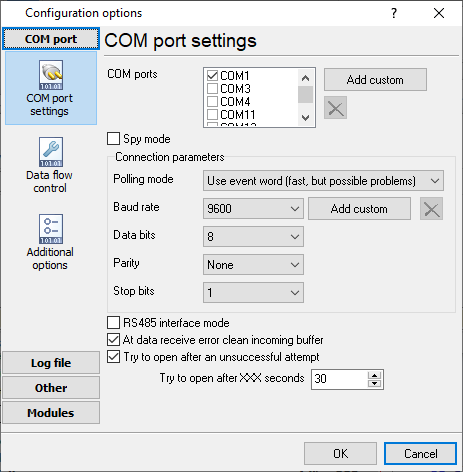
2. CS1000 will pump out raw CDR data at 9600 7/N/1 (Note: the 7 data bits!).
If you can't capture data using default parameters, then verify your PBX settings:
1. CDR Data Block - use LD 21 and LD 15 to show/change the current settings.
REQ:  PRT
TYPE:  CDR
TYPE  CDR_DATA
CUST  0
TYPE  CDR_DATA
CUST  00
CDR  YES
IMPH  NO
OMPH  NO
AXID  YES
TRCR  YES
CDPR  YES
ECDR  YES
BDI  YES
OTCR  YES
PORT  02
CNI  DGTS
BCAP  YES
CHLN  4
FCAF  NO
2. Route Data Block - use LD 21 and LD 16 to show/change the current settings for each route.
LD 21
PT1000

REQ:  PRT
TYPE:  RDB
CUST  0
ROUT  100
ACOD
TYPE  RDB
CUST  00
DMOD
ROUT  1
3. Serial Data Port - use LD 22 and LD 17 to show/change the current serial port settings.
LD 22
REQ  PRT
TYPE  ADAN
Below are settings for COM2 for CDR.
ADAN  TTY 2
TTY_TYPE  SDI
CAB  00
CARD  00
PORT  2
DES  CDR
BPS  9600
BITL  7
STOP  1
PARY  NONE
FLOW  NO
USER  CTY
CUST  00
Please, look at this document for more info about CDR on CS 1000.
Settings from the manufacturer's documentation
Taken from Nortel Meriadian 11c CDR format and description, Veramark - Connectivity Guide. Values are those stated in the documentation; confirm them against your firmware release.
| Setting | Documented value |
|---|---|
| SDI/CDR baud rate options | 300, 1200, 2400, 4800, 9600 |
| OLD vs NEW CDR record length | OLD format: one 80-char line, ~100 bytes average; NEW format: 86-char + 85-char + 42-char lines (plus a 13-char line if Time to Answer is active) |
| example port setup (Veramark integration guide) | BPS 1200, BITL 8, STOP 1, PARY NONE, FLOW NO, USER CTY |
Switching SMDR output on, as documented
- In LD 17, add or change a TTY port (ADAN NEW/CHG TTY x), set USER CTY (CDR teletype) or CDL (CDR data link), then under PARM set FCDR to OLD or NEW to choose the CDR record format.
- In LD 17 PARM, set PCDR to YES to give CDR output priority over call processing (may degrade call-processing capacity) or NO for normal priority.
- In LD 17 PARM, set DUR5 to YES for half-second call-duration accuracy (requires the JPN package) or NO for two-second accuracy.
Record format notes
- RECTYPE is a single letter identifying the CDR record type: A=Authorization Code, B=Abandoned call, C=Charge, D=Station Activity, E=End, F=Conference connection, G/H=Packet Handler data call, I=Initialization, L=Internal call, M=Charge for Conference, N=Normal, P=Calling Party Number, Q/R=Connection, S=Start, T=Time stamp, X=Transfer, Y=Public Network Feature Invocation.
- ORIGID (originator) is formatted DNxxxx for stations, Trrrmmm for trunks (route+member), ATTNxx for attendants (1-63), CFlllnn for conference loops.
Configuring a COM port
The COM port number should match the number in your system. You can check the correct port number in Devices Manager → Ports.
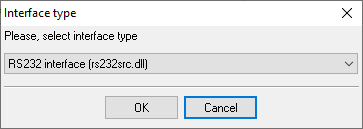
1. Add a new configuration with the RS232 data source (if you didn't it before).
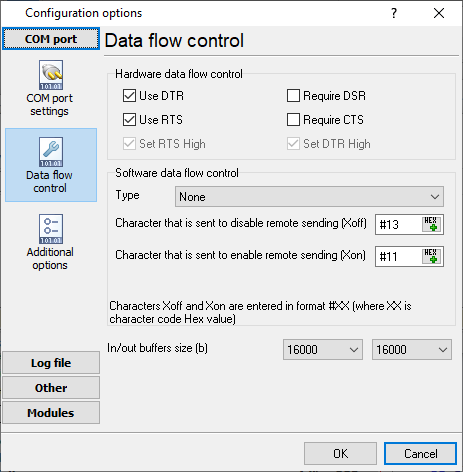
2. Select the COM port and configure the communication settings for your PBX corresponding to your PBX settings.
Selecting the correct parser for Nortel CS1000 (2 rows)

Nortel CS1000 (2 rows)
Nortel CS1000 (2 rows)
Data items
| Description | Data type | Column name |
|---|---|---|
| Record type | string | CALL_TYPE |
| Record type name | string | RECORD_TYPE_NAME |
| Customer No | string | FLAG2 |
| Source | string | FLAG3 |
| Destination | string | FLAG4 |
| Trunk | string | TRUNK |
| Extension | string | EXT |
| Call time | datetime | CALL_TIME |
| Call duration | datetime | CALL_DURATION |
| Call duration (s) | integer | CALL_DURATION_S |
| Call direction | string | DIRECTION |
| Phone | string | DIALED_PHONE |
| Phone (w/o city code) | string | DIALED_PHONE2 |
| Caller phone | string | CALLER_PHONE |
Sample record
As delivered by the system; phone numbers, names and public addresses are masked.
 &       0000    0000   765xxxxxxxXXXXXX
N 103 00 A031072 8123    11/02 16:56 00:05:38
 &       0000    0000   765xxxxxxxXXXXXX               3173
Reports and a database
Once records arrive, the logger writes them to a text file or to any ODBC database in real time, or hands them to the PBX Reports utility for manual, scheduled and e-mailed reports with a built-in web server. See exporting call log data to a database for the database setup.
Related Nortel systems
NitsukoNitsuko DX2E-32i
Nortel Meridian (1 row)
Nortel Meridian (2 rows)
Nortel Meridian and Norstar SMDR formats
All supported PBX systems
Note: Products and companies mentioned here are used only for definition and identification purposes and can be trademarks and/or registered trademarks of the respective companies.
Related topics: Advanced PBX Data Logger
hereCall logging Call accounting SMDR to SQL SMDR Listener Cables and signals