
Mitel 3300 ICP (MiVoice Business) SMDR formats and setup
This page covers the Mitel Mitel 3300 ICP (Universal), Mitel 3300 ICP (Standard Format) and Mitel 3300 ICP (Standard Full) variants in Advanced PBX Data Logger. Each section gives the connection settings, the parser to select and the fields the logger extracts for reports or a database; where the setup steps are the same for every variant they are given once. The settings apply to our logger; other call accounting software may expect a different configuration.
Quick facts
| Item | Mitel 3300 ICP (MiVoice Business) SMDR formats and setup |
|---|---|
| Variants on this page | Mitel 3300 ICP (Universal), Mitel 3300 ICP (Standard Format), Mitel 3300 ICP (Standard Full) |
| Interface | Differs by variant; see each section. |
| Port | 1752 |
| Parsers | Mitel 3300 ICP (Universal), Mitel 3300 ICP (Standard Format), Mitel 3300 ICP (Standard Full) |
| Fields extracted | 14 to 30 |
| Other Mitel systems | Mitel SX-200D, CS-5000 and Inter-Tel SMDR formats |
Variants on this page
- Mitel 3300 ICP (Universal) · Serial printer port or LAN, whichever the system uses for SMDR output, 30 fields
- Mitel 3300 ICP (Standard Format) · LAN, port 1752, 14 fields
- Mitel 3300 ICP (Standard Full) · Serial printer port or LAN, whichever the system uses for SMDR output, 25 fields
Mitel 3300 ICP (Universal)
Parser: Mitel 3300 ICP (Universal)
Connection: Serial printer port or LAN, whichever the system uses for SMDR output. The record layout identifies the format.
Fields extracted: 30
Mitel 3300 ICP support for logs and real time events
This feature allows to direct each of the four the Mitel Networks 3300 ICP log applications and ACD Real time events to remote applications via IP. The remote IP application (our PBX Data Logger) must act as TCP/IP clients. The system listens on the following port addresses for remote connection requests. You should confiure our software as TCP client and specify remote address like: xxx.xxx.xxx.xxx 1752, where xxx.xxx.xxx.xxx is IP address of your PBX.
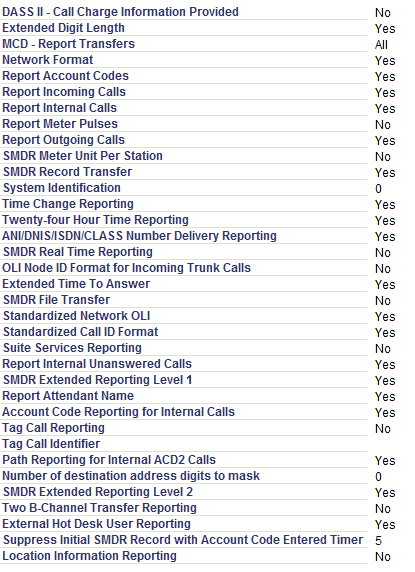
Mitel 3300 ICP SMDR settings
System Administration > System Options > SMDR Options Assignment. The following settings are available, and should be changed to match the associated value:
DASS II - Call Charge Information Provided: No
Extended Digit Length: Yes
MCD - Report Transfers: No
Network Format: Yes
Report Account Codes: Yes
Report Incoming Calls: Yes
Report Internal Calls: Yes
Report Meter Pulses: No
Report Outgoing Calls: Yes
SMDR Meter Unit Per Station: Yes
SMDR Record Transfer: Yes
System Identification
Time Change Reporting: Yes
Twenty-four Hour Time Reporting: Yes
ANI/DNIS/ISDN/CLASS Number Delivery Reporting: Yes
SMDR Real Time Reporting: No
OLI Node ID Format for Incoming Trunk Calls: No
Extended Time To Answer: Yes
SMDR File Transfer: No
Standardized Network OLI: Yes
Standardized Call ID Format: Yes
Suite Services Reporting: Tes
Report Internal Unanswered Calls: Yes or No
SMDR Extended Reporting Level 1: Yes
SMDR Extended Reporting Level 2: Yes
Report Attendant Name: No
OPS manager
Settings from the manufacturer's documentation
Taken from Mitel 3300 ICP, mitel 3300 - tech data services prog ref, Mitel 3300 smdr summary of fields table, Mitel CallAccounting InstallationGuide. Values are those stated in the documentation; confirm them against your firmware release.
| Setting | Documented value |
|---|---|
| SMDR TCP port | 1752 |
| output ports for other 3300 ICP data streams | Software logs 1750, Maintenance logs 1751, SMDR logs 1752, Hotel logs 1753, LPR1 printer port 1754, ACD RTEs 15373 |
| standard record length | 90 characters |
| record length with ANI/DNIS/ISDN/CLASS Number Delivery Reporting enabled | 112 characters |
| record length with Standardized Network OLI enabled | 131 characters |
| alternate SMDR delivery via IP console MN5550 | fixed 1200 baud, cannot be changed |
Switching SMDR output on, as documented
- In the Dimension and Feature Selection form, set the SMDR-External field to "Yes" to enable the external SMDR feature package.
- In the Class of Service Options Assignment form, enable SMDR-External for each group of trunks or stations you want external SMDR data from.
- In the SMDR Options Assignment form, enter Yes in the Value field beside each desired SMDR option.
- On the Class of Service Options Assignment Form, select Yes for the SMDR External option to activate trunking SMDR.
- On the Class of Service Options Assignment Form, select Yes for the SMDR Internal option to activate station-to-station SMDR.
- As an alternative to the 1752 socket, program the MN5550 IP console's SC5550 OUT system port and set the Application logical port assignment to SMDR continuous.
Record format notes
- Standard SMDR record is 90 characters; enabling Extended Digit Length increases it to 101 characters.
- Long Call field is blank under 5 minutes, a dash for 5-9:59, percent sign for 10-29:59, plus sign for 30+ minutes.
- SMDR Extended Reporting Level 1 records start time to the minute; Level 1+Level 2 records start time to the second.
- Extended Reporting adds four internal call-completion flags: O (occupied/busy), D (Do Not Disturb), S (out-of-service), U (attendant unavailable).
Data items: Mitel 3300 ICP (Universal)
| Description | Data type | Column name |
|---|---|---|
| Flag 1 | string | FLAG1 |
| Call time | datetime | CALL_DATE |
| Call duration | datetime | CALL_DURATION |
| Call duration (s) | integer | CALL_DURATION_S |
| Calling party | string | FLAG3 |
| Trunk | string | TRUNK |
| Extension | string | EXT |
| Direction | string | DIRECTION |
| Attendant answered or initiated the call | string | ATTENDANT |
| Time to answer | integer | TIME_ANSWER |
| Ring duration | datetime | RING |
| Digits dialed | string | DIGITS_DIALED |
| Dialed phone | string | DIALED_PHONE |
| Caller phone | string | CALLER_PHONE |
| Call completion status | string | CALL_TYPE |
| Call flags | string | FLAG4 |
| Called party | string | FLAG5 |
| LDN called | string | LDN |
| Transfer flag | string | IS_TRANSFER |
| Transfer destination (3rd party) | string | FLAG7 |
| Account code | string | ACC |
| Route optimization flag | string | ROUTE_OPTIMIZ |
| System identifier | string | SYS_ID |
| Autovon call priority level | string | CALL_PRIORITY_LEVEL |
| ANI | string | ANI |
| DNIS | string | DNIS |
| Call ID | string | FLAG6 |
| Suite ID | string | SUITE_ID |
| Call sequence ID | string | CALL_SEQ_ID |
| Associated call ID | string | CALL_ID2 |
Sample record
As delivered by the system; phone numbers, names and public addresses are masked.
 03/04 15:19  00:00:31 X901      899                       ASX999
 03/04 15:19  00:00:34 X901  002 4111 517899 517899          X999                          706xxxxxxx 4111
 03/04 15:16  00:03:40 455       770xxxxxxx                A X901
Mitel 3300 ICP (Standard Format)
Parser: Mitel 3300 ICP (Standard Format)
Connection: LAN. The PBX accepts a connection on TCP port 1752; the logger connects to the PBX IP address. Port 1752.
Fields extracted: 14
Mitel 3300 ICP support for logs and real time events
This feature allows to direct each of the four the Mitel Networks 3300 ICP log applications and ACD Real time events to remote applications via IP. The system listens on the following port addresses for remote connection requests.
Mitel 3300 ICP SMDR settings
System Administration > System Options > SMDR Options Assignment. The following settings are available, and should be changed to match the associated value:
DASS II - Call Charge Information Provided: No
Extended Digit Length: No
MCD - Report Transfers: No
Network Format: Yes
Report Account Codes: Yes
Report Incoming Calls: Yes
Report Internal Calls: Yes
Report Meter Pulses: No
Report Outgoing Calls: Yes
SMDR Meter Unit Per Station: Yes
SMDR Record Transfer: Yes
System Identification
Time Change Reporting: Yes
Twenty-four Hour Time Reporting: Yes
ANI/DNIS/ISDN/CLASS Number Delivery Reporting: No
SMDR Real Time Reporting: No
OLI Node ID Format for Incoming Trunk Calls: No
Extended Time To Answer: No
SMDR File Transfer: No
Standardized Network OLI: No
Standardized Call ID Format: No
Suite Services Reporting: No
Report Internal Unanswered Calls: No
SMDR Extended Reporting Level 1: No
SMDR Extended Reporting Level 2: No
Report Attendant Name: No
Settings from the manufacturer's documentation
Taken from Mitel 3300 ICP, mitel 3300 - tech data services prog ref, Mitel 3300 smdr summary of fields table, Mitel CallAccounting InstallationGuide. Values are those stated in the documentation; confirm them against your firmware release.
| Setting | Documented value |
|---|---|
| SMDR TCP port | 1752 |
| standard record length | 90 characters (Extended Digit Length disabled for this variant) |
Switching SMDR output on, as documented
- In the Dimension and Feature Selection form, set the SMDR-External field to "Yes" to enable the external SMDR feature package.
- In the Class of Service Options Assignment form, enable SMDR-External for each group of trunks or stations you want external SMDR data from.
Record format notes
- This variant disables Extended Digit Length and the other extended-reporting options, so it stays at the base 90-character record.
Data items: Mitel 3300 ICP (Standard Format)
| Description | Data type | Column name |
|---|---|---|
| Long call flag | string | FLAG1 |
| Call time | datetime | CALL_TIME |
| Call duration | datetime | CALL_DURATION |
| Call duration (s) | integer | CALL_DURATION_S |
| Calling party | string | EXT |
| Caller phone | string | CALLER_PHONE |
| Attendant | string | FLAG2 |
| Phone | string | DIALED_PHONE |
| Call completion status | string | CALL_TYPE |
| Call flags | string | FLAG4 |
| Called party | string | FLAG5 |
| Transfer-conference call | string | FLAG6 |
| Trunk | string | TRUNK |
| Account code | string | ACC |
Mitel 3300 ICP (Standard Full)
Parser: Mitel 3300 ICP (Standard Full)
Connection: Serial printer port or LAN, whichever the system uses for SMDR output. The record layout identifies the format.
Fields extracted: 25
Mitel 3300 ICP support for logs and real time events
This feature allows to direct each of the four the Mitel Networks 3300 ICP log applications and ACD Real time events to remote applications via IP. The remote IP application (our PBX Data Logger) must act as TCP/IP clients. The system listens on the following port addresses for remote connection requests. You should confiure our software as TCP client and specify remote address like: xxx.xxx.xxx.xxx 1752, where xxx.xxx.xxx.xxx is IP address of your PBX.
Mitel 3300 ICP SMDR settings
System Administration > System Options > SMDR Options Assignment. The following settings are available, and should be changed to match the associated value:
DASS II - Call Charge Information Provided: No
Extended Digit Length: No
MCD - Report Transfers: No
Network Format: Yes
Report Account Codes: Yes
Report Incoming Calls: Yes
Report Internal Calls: Yes
Report Meter Pulses: No
Report Outgoing Calls: Yes
SMDR Meter Unit Per Station: Yes
SMDR Record Transfer: Yes
System Identification
Time Change Reporting: Yes
Twenty-four Hour Time Reporting: Yes
ANI/DNIS/ISDN/CLASS Number Delivery Reporting: Yes
SMDR Real Time Reporting: No
OLI Node ID Format for Incoming Trunk Calls: No
Extended Time To Answer: No
SMDR File Transfer: No
Standardized Network OLI: Yes
Standardized Call ID Format: Yes
Suite Services Reporting: No
Report Internal Unanswered Calls: No
SMDR Extended Reporting Level 1: No
SMDR Extended Reporting Level 2: No
Report Attendant Name: No
Settings from the manufacturer's documentation
Taken from Mitel 3300 ICP, mitel 3300 - tech data services prog ref, Mitel 3300 smdr summary of fields table, Mitel CallAccounting InstallationGuide. Values are those stated in the documentation; confirm them against your firmware release.
| Setting | Documented value |
|---|---|
| SMDR TCP port | 1752 |
| standard record length | 90 characters (Extended Digit Length disabled for this variant, per its listed SMDR settings) |
Switching SMDR output on, as documented
- In the Class of Service Options Assignment form, enable SMDR-External for each group of trunks or stations you want external SMDR data from.
- In the SMDR Options Assignment form, enter Yes in the Value field beside each desired SMDR option.
Record format notes
- Standardized Network OLI and Standardized Call ID Format enabled for this variant extend the record to 131 characters per the field-length rules.
Data items: Mitel 3300 ICP (Standard Full)
| Description | Data type | Column name |
|---|---|---|
| Long call flag | string | FLAG1 |
| Call time | datetime | CALL_TIME |
| Call duration | datetime | CALL_DURATION |
| Call duration (s) | integer | CALL_DURATION_S |
| Calling party | string | FLAG3 |
| Called party | string | FLAG5 |
| Trunk | string | TRUNK |
| Extension | string | EXT |
| Direction | string | DIRECTION |
| Attendant answered or initiated the call | string | FLAG2 |
| Time to answer | integer | TIME_ANSWER |
| Ring | datetime | RING |
| Caller phone | string | CALLER_PHONE |
| Dialed phone | string | DIALED_PHONE |
| Meter pulses | string | METER_PULSES |
| Call completion status | string | CALL_TYPE |
| Call flags | string | FLAG4 |
| Transfer-conference call | string | FLAG6 |
| Account code | string | ACC |
| MLPP Precedence Level | string | MLPP |
| ANI | string | ANI |
| DNIS | string | DNIS |
| Call ID | string | CALL_ID |
| Call sequence ID | string | CALL_SEQ |
| Associated Call Identifier | string | ASSOC_CALL_ID |
Sample record
As delivered by the system; phone numbers, names and public addresses are masked.
-04/22 10:54:08  0000:07:49 5162         440xxxxx                  A X9999                                 001   15162                                   M001xxxx A
 04/22 11:01:42  0000:00:31 5113    0006 5105                      I 5105                                  001
 04/22 11:02:18  0000:00:17 8075    0011 1314                      I 1314                                  001
Connecting the logger
Add a data source in PBX Data Logger that matches the interface named in the section for your variant (RS232, TCP client, TCP server or FTP), then open Modules → Query Parse Filter → Data query, click Setup and select the parser named there.
Mitel programming software
Mitel 3300 ICP and MiVoice Business are administered through the ESM web interface (Embedded System Management) built into the controller; it is not a download from AGG Software. SMDR output is switched on there; PBX Data Logger receives the records.
Reports and a database
Once records arrive, the logger writes them to a text file or to any ODBC database in real time, or hands them to the PBX Reports utility for manual, scheduled and e-mailed reports with a built-in web server. See exporting call log data to a database for the database setup.
Related Mitel systems
Mitel 5000 CPMitel 5000
Mitel SX-200D, CS-5000 and Inter-Tel SMDR formats
Mitel 3000
Meisei 100-D R3
All supported PBX systems
Note: Products and companies mentioned here are used only for definition and identification purposes and can be trademarks and/or registered trademarks of the respective companies.
Related topics: Advanced PBX Data Logger
hereCall logging Call accounting SMDR to SQL SMDR Listener Cables and signals