
Siemens Hicom, HiPath variants and Rolm CDR formats
Advanced PBX Data Logger includes 10 parsers for Siemens Hicom, HiPath and Rolm systems. This page gathers them in one place. For each system you will find how the call records reach the logger, the parser to select, and the 106 fields in total that these parsers extract for PBX Reports or a database. Of these, 1 over RS-232; the rest are identified by their record layout and can arrive over a serial port or a LAN connection. The settings apply to our logger; other call accounting software may expect a different configuration.
Systems on this page
- Siemens Hicom-118 · RS-232, 9 fields
- Siemens Hicom-250 · Serial or TCP, 6 fields
- Siemens Hicom-300E (ANI format) · Serial or TCP, 14 fields
- Siemens Hicom-300H (ANI format) · Serial or TCP, 15 fields
- Siemens Hicom-300H · Serial or TCP, 9 fields
- Siemens HiPATH 1100 · Serial or TCP, 10 fields
- Siemens Hipath-35xx (CSV) · Serial or TCP, 13 fields
- Siemens Hipath 4000 (CDRE) · Serial or TCP, 8 fields
- Siemens Rolm 9751 (Compat,no ANI) · Serial or TCP, 14 fields
- Rolm Redwood 9722 · Serial or TCP, 8 fields
Connecting the logger
Add a data source in PBX Data Logger that matches the interface named in each section: RS232 for a serial SMDR port, TCP client when the PBX accepts connections, TCP server when the PBX pushes records to the logger, or FTP for systems that write CDR files. Then open Modules → Query Parse Filter → Data query, click Setup and select the parser named in the section. The general steps are shown on the SMDR listener page; every other supported system is listed on the supported PBX index.
Siemens Hicom-118
Parser: Siemens Hicom-118
Connection: Serial. The SMDR or printer port of the PBX is connected to a COM port; speed, data bits, parity and flow control must match the PBX.
Fields extracted: 9
Connection parameters
This information is applicable for: Hicom 100, Hicom 110, Hicom 120
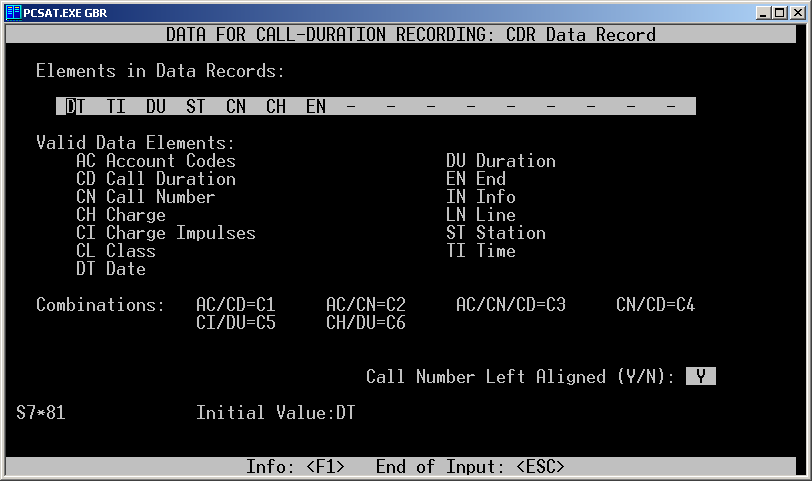
With the "PCSAT" software you should configure the following:
Data for Call-Duration Recording
Line-Related Data for CDR
Outgoing Calls: Y
Incoming Calls: Y
Account Codes: Y
Data Mode Intervals: Y
System Data for Printer and Interface
Followed by blank lines: N
Lines per page: 00
Data records per page: 00
Control characters preceding records: - -
Control characters following records: CR LF
CDR Data Record
Set elements to one of the following configurations:
DT TI DU ST CN CH EN
DT TI DU ST CN CH CI EN

Pinouts PC to Hicom (via standard patch lead)
DB25
1 –
2 – WHITE
3 – RED
4 – YELLOW
5 – ORANGE
6 – GREEN
7 – BROWN
8 – BLACK
9 –
10 –
11 –
12 –
13 –
14 –
15 –
16 –
17 –
18 –
19 –
20 – BLUE
21 –
22 –
23 –
24 –
25 –
DB 9
1 – BLACK
2 – WHITE
3 – RED
4 – GREEN
5 – BROWN
6 – BLUE
7 – ORANGE
8 – YELLOW
9–
| PBX (25 pin male) | PC (9 pin female) | PC (25 pin female) |
|---|---|---|
| 7 | 5 | 7 |
| 2 | 2 | 3 |
| 3 | 3 | 2 |
| 4 | 8 | 20 |
| 5 | 7 | 5 |
Data items: Siemens Hicom-118
| Description | Data type | Column name |
|---|---|---|
| Call time | datetime | CALL_TIME |
| CO | string | TRUNK |
| External | string | EXT |
| Ring | datetime | RING |
| Call duration | datetime | CALL_DURATION |
| Call duration (s) | integer | CALL_DURATION_S |
| Phone | string | DIALED_PHONE |
| Call type | string | CALL_TYPE |
| Direction | string | DIRECTION |
Sample record
As delivered by the system; phone numbers, names and public addresses are masked.
25.04.01 05:41:43  4    29 01:01                                            1
25.04.01 05:41:51  2    24                                                  0
25.04.01 05:42:06  2    13                                                  0
Siemens Hicom-250
Parser: Siemens Hicom-250
Connection: Serial printer port or LAN, whichever the system uses for SMDR output. The record layout identifies the format.
Fields extracted: 6
Data items: Siemens Hicom-250
| Description | Data type | Column name |
|---|---|---|
| Call time | datetime | CALL_TIME |
| Call duration | datetime | CALL_DURATION |
| Call duration (s) | integer | CALL_DURATION_S |
| External | string | EXT |
| CO | string | TRUNK |
| Phone | string | DIALED_PHONE |
Sample record
As delivered by the system; phone numbers, names and public addresses are masked.
22/12/05  13:16:48  00:05:09   112    04  454414
22/12/05  13:17:45  00:01:09   109    05  770xxxx
22/12/05  13:18:07  00:01:47   110    03  382319
Siemens Hicom-300E (ANI format)
Parser: Siemens Hicom-300E (ANI format)
Connection: Serial printer port or LAN, whichever the system uses for SMDR output. The record layout identifies the format.
Fields extracted: 14
Data items: Siemens Hicom-300E (ANI format)
| Description | Data type | Column name |
|---|---|---|
| Service type | string | FLAG1 |
| Source device type | string | FLAG2 |
| Call time | datetime | CALL_TIME |
| Call duration | datetime | CALL_DURATION |
| Call duration (s) | integer | CALL_DURATION_S |
| Forwadding | string | FLAG3 |
| Destination/answering type | string | FLAG4 |
| Transfer type | string | FLAG5 |
| Caller phone | string | CALLER_PHONE |
| Phone | string | DIALED_PHONE |
| Divert number | string | FLAG6 |
| Source trunk ID | string | TRUNK |
| Destination trunk ID | string | EXT |
| Account code | string | ACC |
Siemens Hicom-300H (ANI format)
Parser: Siemens Hicom-300H (ANI format)
Connection: Serial printer port or LAN, whichever the system uses for SMDR output. The record layout identifies the format.
Fields extracted: 15
Data items: Siemens Hicom-300H (ANI format)
| Description | Data type | Column name |
|---|---|---|
| Service type | string | FLAG1 |
| Source device type | string | FLAG2 |
| Call time | datetime | CALL_TIME |
| Call duration | datetime | CALL_DURATION |
| Call duration (s) | integer | CALL_DURATION_S |
| Forwadding | string | FLAG3 |
| Destination/answering type | string | FLAG4 |
| Transfer type | string | FLAG5 |
| Caller phone | string | CALLER_PHONE |
| Phone | string | DIALED_PHONE |
| Originally dialed | string | FLAG6 |
| Trunk access code | string | FLAG7 |
| Source trunk ID | string | TRUNK |
| Destination trunk ID | string | EXT |
| Account code | string | ACC |
Siemens Hicom-300H
Parser: Siemens Hicom-300H
Connection: Serial printer port or LAN, whichever the system uses for SMDR output. The record layout identifies the format.
Fields extracted: 9
Settings from the manufacturer's documentation
Taken from SMDR - some formats. Values are those stated in the documentation; confirm them against your firmware release.
| Setting | Documented value |
|---|---|
| SMDR output form/template | Form number 2 is the PBX's default output format |
Record format notes
- This exact record layout/feature is shared verbatim with the Hicom 300E communications server, version 6.5, Release 9006i.
- Names the official Siemens reference document for this record format.
- Field A: service indicator code (voice=0, data=2, fax=3).
- Field B: source device type code (trunk=1, subscriber=2, night service=N, attendant=A).
- Field C: start-of-connection date, format mm/dd/yy.
- Field F: D=DISA call, P=PIN used.
- Field H: destination/answering type code (1=trunk, 2=subscriber, A=attendant, N=night service, R=ACD recorder).
- Field I: transfer type code (A=attendant transfer, E=end of long call, G=ongoing long call, T=transfer/move).
- Field M: source/calling party fully-qualified number, or trunk ID if unknown.
- Field N: destination/answering number.
- Field S: account code.
- Field U: modem pool number.
Data items: Siemens Hicom-300H
| Description | Data type | Column name |
|---|---|---|
| Call type | string | CALL_TYPE |
| Direction | string | DIRECTION |
| Call duration | datetime | CALL_DURATION |
| Call duration (s) | integer | CALL_DURATION_S |
| Call time | datetime | CALL_TIME |
| Extension | string | EXT |
| Caller phone | string | CALLER_PHONE |
| Dialed phone | string | DIALED_PHONE |
| CO | string | TRUNK |
Siemens HiPATH 1100
Parser: Siemens HiPATH 1100
Connection: Serial printer port or LAN, whichever the system uses for SMDR output. The record layout identifies the format.
Fields extracted: 10
Data items: Siemens HiPATH 1100
| Description | Data type | Column name |
|---|---|---|
| Call time | datetime | CALL_TIME |
| CO | string | TRUNK |
| External | string | EXT |
| Ring | datetime | RING |
| Call duration | datetime | CALL_DURATION |
| Call duration (s) | integer | CALL_DURATION_S |
| Phone | string | DIALED_PHONE |
| Call type | string | CALL_TYPE |
| Direction | string | DIRECTION |
| Cost | float | COST |
Sample record
As delivered by the system; phone numbers, names and public addresses are masked.
10.07.07 15:51:33 04 101                        203xxxxxx            *      0.00
10.07.07 15:51:20 06 101               00:00:24 343xxxx              2      0.00
10.07.07 15:51:45 06 214               00:01:43 343xxxx              6      0.00
Siemens Hipath-35xx (CSV)
Parser: Siemens Hipath-35xx (CSV)
Connection: Serial printer port or LAN, whichever the system uses for SMDR output. The record layout identifies the format.
Fields extracted: 13
Data items: Siemens Hipath-35xx (CSV)
| Description | Data type | Column name |
|---|---|---|
| Call time | datetime | CALL_TIME |
| Trunk | string | TRUNK |
| Line | string | EXT |
| Ring duration | datetime | RING |
| Call duration | datetime | CALL_DURATION |
| Call duration (s) | integer | CALL_DURATION_S |
| Cost | float | COST |
| Call type | string | CALL_TYPE |
| Direction | string | DIRECTION |
| Phone | string | DIALED_PHONE |
| Caller phone | string | CALLER_PHONE |
| DNIS | string | DNIS |
| Route table | string | FLAG2 |
Sample record
As delivered by the system; phone numbers, names and public addresses are masked.
03.30.0707:35:12 34  4293             133xxxxxxxx                          0                             50
03.30.0707:35:31 34  429300:0900:00:141xxxxxxxxxx                          1                             50
03.30.0707:35:45 34  4044             133xxxxxxxx                          0                             50
Siemens Hipath 4000 (CDRE)
Parser: Siemens Hipath 4000 (CDRE)
Connection: Serial printer port or LAN, whichever the system uses for SMDR output. The record layout identifies the format.
Fields extracted: 8
Data items: Siemens Hipath 4000 (CDRE)
| Description | Data type | Column name |
|---|---|---|
| Call time | datetime | CALL_TIME |
| Call duration (s) | integer | CALL_DURATION_S |
| Call type | string | CALL_TYPE |
| Direction | string | DIRECTION |
| CO | string | TRUNK |
| External | string | EXT |
| Caller phone | string | CALLER_PHONE |
| Phone | string | DIALED_PHONE |
Siemens Rolm 9751 (Compat,no ANI)
Parser: Siemens Rolm 9751 (Compat,no ANI)
Connection: Serial printer port or LAN, whichever the system uses for SMDR output. The record layout identifies the format.
Fields extracted: 14
Data items: Siemens Rolm 9751 (Compat,no ANI)
| Description | Data type | Column name |
|---|---|---|
| Service indicator | string | CALL_TYPE |
| Source device type | string | FLAG2 |
| Call time | datetime | CALL_TIME |
| Call duration | datetime | CALL_DURATION |
| Call duration (s) | integer | CALL_DURATION_S |
| Flags | string | FLAG3 |
| Phone | string | DIALED_PHONE |
| Trunk | string | TRUNK |
| Extension | string | EXT |
| Call direction | string | DIRECTION |
| Access code | string | AUTH |
| Account code | string | ACC |
| DNIS/DISA | string | DNIS |
| Modem pool number | string | FLAG4 |
Rolm Redwood 9722
Parser: Rolm Redwood 9722
Connection: Serial printer port or LAN, whichever the system uses for SMDR output. The record layout identifies the format.
Fields extracted: 8
Data items: Rolm Redwood 9722
| Description | Data type | Column name |
|---|---|---|
| Call time | datetime | CALL_TIME |
| Call duration | datetime | CALL_DURATION |
| Call duration (s) | integer | CALL_DURATION_S |
| Ext | string | EXT |
| CO | string | TRUNK |
| Phone | string | DIALED_PHONE |
| Direction | string | DIRECTION |
| Call type | string | CALL_TYPE |
Sample record
As delivered by the system; phone numbers, names and public addresses are masked.
03:22:01 00:22:22 12 087xxxxxxx 1234 2345
Reports and a database
Once records arrive, the logger writes them to a text file or to any ODBC database in real time, or hands them to the PBX Reports utility for manual, scheduled and e-mailed reports with a built-in web server. See exporting call log data to a database for the database setup.
Related Siemens Hicom, HiPath and Rolm systems with their own setup pages
Siemens Hicom-150 OfficeCom v2Siemens Hicom-150 OfficeCom
Siemens Hicom-350H
Siemens Hipath-3350
Siemens Hipath-3500
Siemens Hipath-3550 v2
Siemens Hipath-3550
Siemens Hipath-3700
Siemens Hipath-37xx (CSV)
Siemens Hipath-37xx (Delimited by Pipe)
Siemens Hipath-3800
Siemens Hipath 4000 (CDR Standard Format)
Note: Products and companies mentioned here are used only for definition and identification purposes and can be trademarks and/or registered trademarks of the respective companies.
Related topics: Advanced PBX Data Logger
hereCall logging Call accounting SMDR to SQL SMDR Listener Cables and signals