
How to Log OPC Data to a SQL Database (MS SQL, MySQL, Oracle)
This guide shows how to log OPC UA or OPC DA data into a database in three easy steps. Reading a value from the OPC Data Access server or writing a data value can be achieved without any programming.
This is the logging approach to OPC to SQL: every change of a tag value becomes a new row with a timestamp, so the table grows into a history you can query and chart. If you need the opposite, a live table in which each OPC tag has one row that is kept up to date and can be written back to the server, use Datatag Link instead: see OPC to SQL: linking an OPC client or server to a database.
- Install the OPC Data Logger software.
- Add an OPC group and the necessary OPC tags.
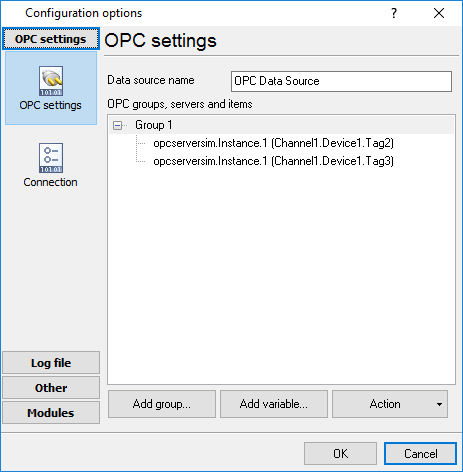
Fig.1. OPC group settings
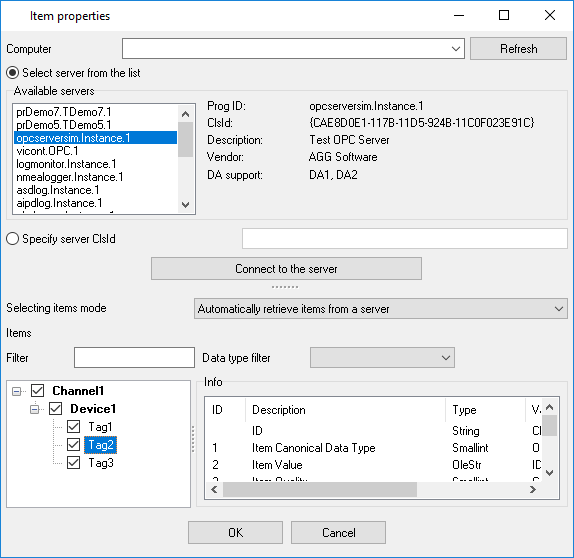
Fig.2. OPC DA or OPC UA tag selection
Configure the database connector that can work with MS SQL Server, MySQL, Oracle, MS Access, and other databases.
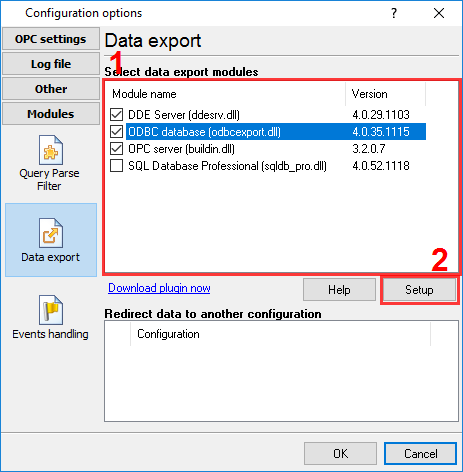
Fig.3. SQL database connector


How to map OPC server data to a SQL database
- Go to the data export plugin settings.
- Import a table description from your SQL database.
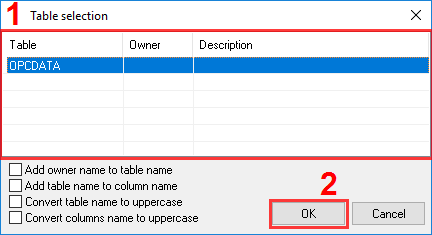
Fig.4. SQL database table
- Link an OPC tag to a column in the dialog window.
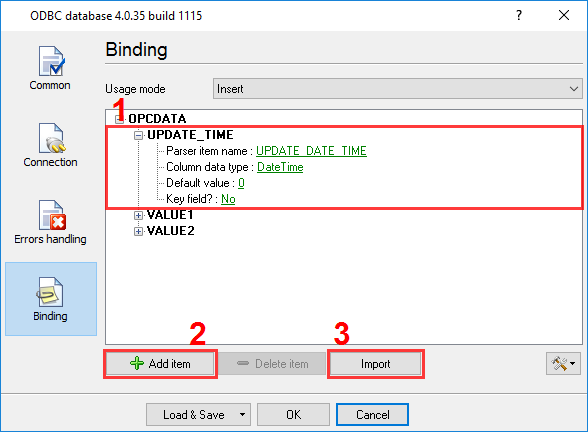
Fig.4. SQL database mapping

What data types supported
The program support all major data types of OPC DA or OPC UA interfaces:
- Signed and unsigned integers (1, 2, 4, and 8 bytes).
- Float (single and double precision).
- Boolean.
- Strings (UTF8 and ASCII).
- Date and timestamps.
- Other minor data types.
Supported databases
The OPC Data Logger software supports all popular databases.
- Microsoft SQL Server (you can use stored procedures, custom SQL queries, high data transfer speed). Examples: many OPC tags in one table and a column per tag.
- MySQL (supports stored procedures, custom SQL queries, high performance). See OPC to MySQL for the ODBC driver and the table syntax.
- Oracle (allows using stored procedures, custom SQL queries, high data transfer speed).
- Microsoft Access: see the OPC-ODBC bridge example.
- PostgreSQL (allows using stored procedures, custom SQL queries, high performance).
- Firebird.
- OLEDB-compatible databases.
- ODBC-compatible databases, and any of the above through the SQL Database Pro plugin: see OPC to a database.
If a file is enough, the program writes the same history to CSV files for Excel.
Operating System Compatibility
Windows Server 2019, Windows 10, Windows Server 2016, Windows 7, Windows Server 2012, and older operating systems down to Windows XP SP3.
OPC Compatibility
- OPC Data Access 2.05a
- OPC Data Access 2.00
- OPC Data Access 1.0a
- OPC Data Access 3.00
- OPC UA Data Access
Do I need third-party components?
You should install runtime components for OPC DA that provide client access to an OPC server. Please, visit the opcfoundation.org
Microsoft SQL Server - client tools for the SQL Server database. All modern OS already includes database drivers for this database.
MySQL - The computer with the OPC software should contain "libmysql.dll." Usually, it comes with the MySQL database.
Related articles: How to Log OPC Data to a SQL Database (MS SQL, MySQL, Oracle)
- Inserting OPC data to MS Access database through ODBC (features: adding groups and items, inserting to an ODBC database)
- Adding a timestamp in the CSV file (features: OPC groups)
- How to log OPC data to a SQL database.
- OPC to MSSQL: Writing a lot of OPC tags to MS SQL database
- OPC to MSSQL: Writing several OPC tags to separate columns
- OPC to MySQL: Writing OPC tags to MySQL database
- OPC to a database: Writing OPC tags to a database
- OPC to SQL with Datatag Link: a live two-way link instead of a log
- OPC to Excel: Writing OPC data to Excel
- Filtering data by a tag value and write data to a database only when the value will change
- Filtering data out if an OPC tag value is not equal to a specified value
- Processing or storing OPC data by an event from the OPC server
- Aggregating data from multiple servers to one OPC server
Related topics: Advanced OPC Data Logger
hereOPC Logger RS232 pinout and signals Cables and signals Data monitor cables