
ASCII & Binary Device Emulator for Serial Port Testing
The Concept of Hardware Emulation
In complex systems integration, the physical hardware is often the last component to arrive. The ASCII and Binary Protocol Emulator plugins for Advanced Serial Port Monitor allow developers to bypass this bottleneck. By acting as a "digital twin" of a slave device, these plugins respond to requests from a Master controller or PC application almost exactly as the real hardware would.
This allows for seamless software development, protocol validation, and stress testing without a single piece of physical hardware on your desk.
From the point of view of project management and quality assurance, deploying a software emulator is much faster than deploying physical hardware in the early stages of development. A real device needs to be physically wired, drivers installed, and the "flash-and-configure" process done for every firmware update. An emulator, on the other hand, can be set up right away from a configuration file that has already been saved.
Plugin Interface & Features
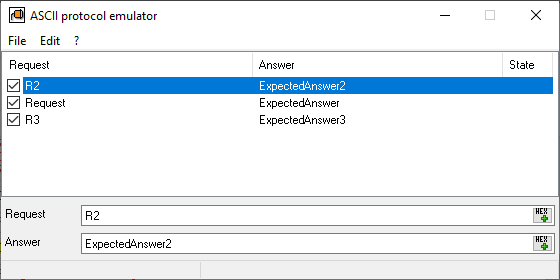
The ASCII protocol emulator interface is optimized for clarity and speed.
- Request/Answer Mapping: A clean table layout displays active rules. Each row represents a "Request and Answer" pair.
- HEX Bytes: As seen in the interface, both Request and Answer fields feature a HEX button. This allows users to input non-printable characters or binary packets that cannot be typed as standard text.
- State Management: The 'State' column indicates the last active rule (received query and processed answer).
- Flexible Editing: The bottom pane allows editing long strings or data packets.
The ASCII protocol emulator module relies on the packet terminators defined in the Advanced Serial Port Monitor settings (for example, #0D#0A) for sent and received data. This means there is no need to manually include the termination characters in each line of the emulator.
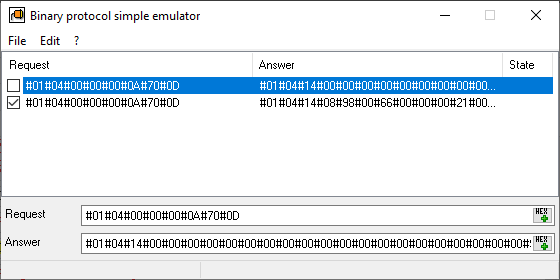
The Binary protocol emulator plugin is optimized for binary data packets without clear framing characters like <CR> or <LF>. If they are present, you should specify them for every request and response.
Typical Usage Scenarios
1. Rapid UI/Dashboard Development
A software team is building a dashboard to display real-time pressure data from an industrial sensor. The sensor is still in production.
- The Solution: Using the ASCII Emulator, the team sets a request string like
GET_PRESand maps it to a simulated response likePRES: 102.5psi. - The Result: The frontend developers can build and test the entire UI logic, ensuring the numbers display correctly before the physical sensor is even wired.
2. QA Testing (Error Handling)
How does your software react when a hardware device sends a corrupted response or an error code?
- The Solution: Instead of trying to break physical hardware to trigger an error, use the Binary Emulator. Program a specific request to return an "Invalid Command" or "Buffer Overflow" packet.
- The Result: You can verify that your software's error-handling routines work perfectly, preventing system crashes in the field. You can manually disable some request-answer pairs to simulate data corruption and unexpected timeouts.
3. Parallel Engineering Workflows
In many projects, the firmware team (Slave) and the software team (Master) work simultaneously.
- The Solution: Both teams agree on a protocol document. The higher-level software team uses the emulator to simulate the firmware's responses.
- The Result: Development can happen in parallel. When the firmware is finally ready, the software is already tested and ready for integration, cutting the project timeline by weeks.
Expert Perspective: Beyond Simple Echoing
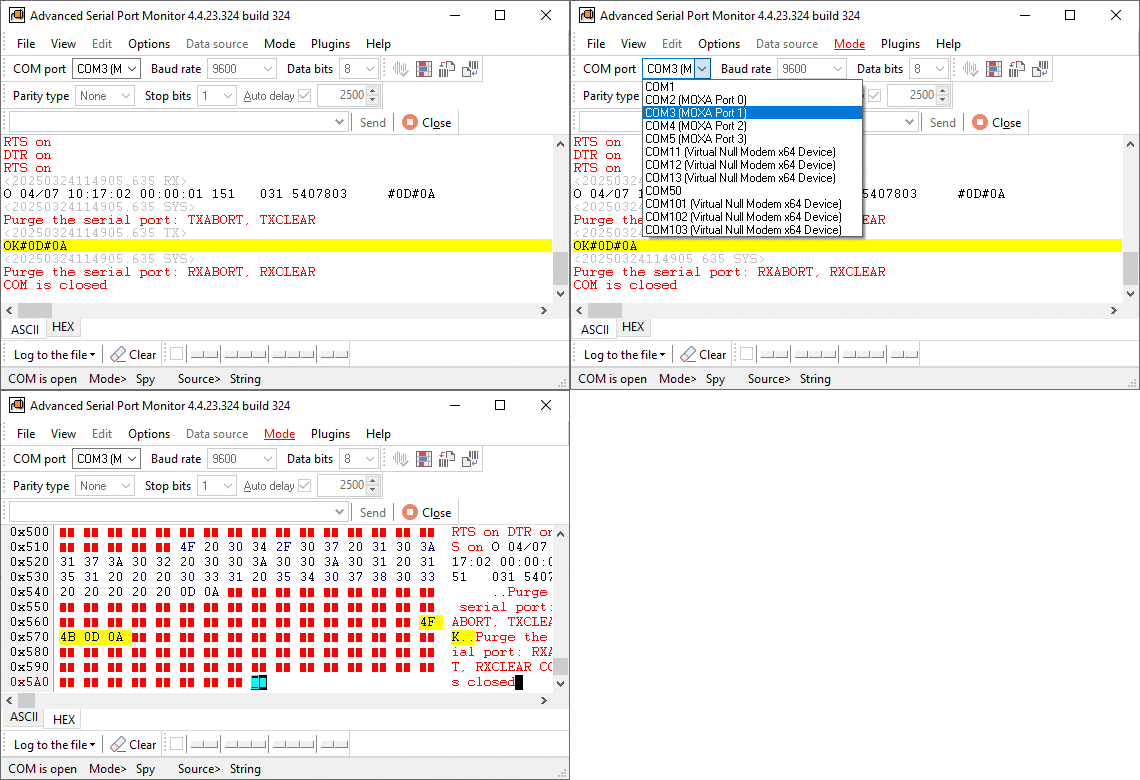
Professional protocol emulation is more than just echoing data. The Advanced Serial Port Monitor plugins handle the nuances of serial communication that standard terminal programs miss.
- Timing Precision: The emulator responds with minimal latency, mimicking the high-performance interrupt-driven logic of industrial PLCs.
- Binary Integrity: With full support for HEX inputs, you can emulate complex binary protocols (like Modbus or similar data packets with checksums) where a single bit determines the validity of a packet.
- Stability: The plugins are designed to run for days during "soak testing," ensuring that your Master application can handle long-term communication without port hang-ups.
See also
Automated Hardware Validation
Identify Active Nodes: MODBUS Device Scan Plugin Guide
ASCII and Binary Device Emulation: Advanced Serial Port Monitor Plugins
Advanced Scripting and Macros
MODBUS Slave Emulator: Advanced Serial Port Monitor Plugin Guide
RS232 Analyzer from Advanced Serial Port Monitor
RS232 Monitor
Related topics: Advanced Serial Port Monitor
hereRS232 monitor RS232 analyzer COM Port Debug RS232 terminal Serial port sniffer Serial port spy UART monitor RS232 pinout and signals Data monitor cables.