
Automating Serial Data Workflows: Advanced Scripting and Macros
The Industrial Need for Automation
In modern manufacturing and R&D, manual terminal entry is a bottleneck. Engineers often find themselves repeating the same "request-response" sequences hundreds of times a day to verify device stability. Whether you are calibrating an industrial weigh scale or testing a new firmware build for a medical sensor, manual input introduces human error and lacks the timing precision needed for stress testing. With scripting, you can turn a simple monitoring tool into a strong Automated Test Equipment (ATE) controller.
Significant Feature Highlight: The Internal Scripting Engine
Advanced Serial Port Monitor integrates a powerful scripting engine that goes beyond simple macros. Unlike basic "send-on-click" buttons, this engine supports logic-based execution. It allows developers to use simple logic to handle loops and conditional branching. The engine can intercept incoming data, analyze answers in real-time, and trigger a specific response only when certain criteria are met, allowing for fully autonomous "handshake" simulations.
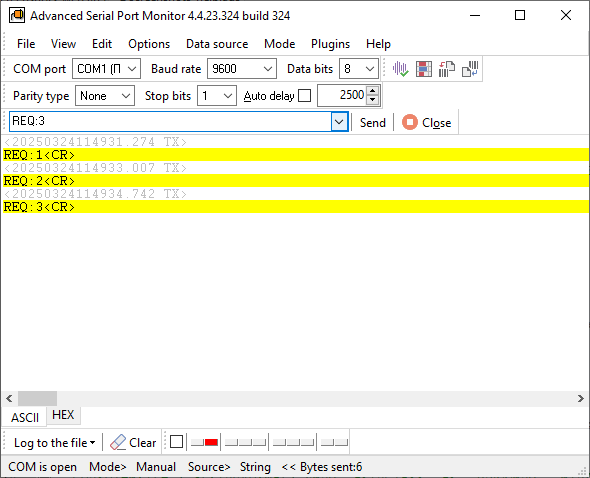
Developing Your First Automation Script
To begin, one must define the "state machine" of the communication. For example, if a device requires an AT+START command and must return an OK before the next command is sent, a script can be written to wait for that specific string.
- Selecting COM Port: Scripts can select the destination COM port number.
- Init Communication Parameters: Then it initialized all communication parameters.
- Sending Data Packet: After this, it sends the "AT+START" data packet to the device with the termination character.
INITPORT COM1
SET BAUD 9600
SET DATABITS 7
SET FLOW NONE
SET PARITY NONE
SET STOPBITS 1
SEND AT+START^M
Simplify Your Test Environments Configuration
Setting up a multi-device test bench usually involves setting up each COM port's parameters and initialization string one by one, which can be very time-consuming. Using Advanced Serial Port Monitor's scripting features, you can combine the setup of your test environments into a single, repeatable process. Instead of switching RTS/CTS lines or sending "wake-up" packets to each connected sensor by hand, a master setup script can set up all active ports with the correct parity, stop bits, and baud rates one at a time. Scripts are saved to files, and then the name of the script is used in the command line (-f script.txt) to start Advanced Serial Port Monitor, and the script will be executed automatically.
INITPORT COM3
SET BAUD 9600
SET DATABITS 7
SET FLOW NONE
SET PARITY NONE
SET STOPBITS 1
SET STAMPVIEW 1
SET CREATEFILEMODE 0
SET OUTPUTFILE com_log.txt
Advanced Use Case: Stress Testing and Buffer Validation
The common usage scenario for scripting is Buffer Stress Testing. By writing a loop that sends data packets and check an expected response, you can identify the exact point at which a peripheral device's buffer overflows or device stopped processing data.
INITPORT COM2
:REPEAT
SEND LASER=1^M
DELAY 2000
SEND ?C1^M
GOTO :REPEAT
Expert Tip: Use the scripting engine to log the "time-to-response". If a device starts responding slower after 5,000 packets, you've identified a memory leak or a processing bottleneck that manual testing would likely miss.
Handling Dynamic Responses and Data Extraction
Often, a data response may contain several variants inside an ASCII string. Using the scripting engine's string manipulation functions, you can wait for several strings in one command. For example, login/password authentication in the remote console.
INITPORT COM6
SET RETRY 3                        ;Try 3 times
:Again
SEND ^C                            ;Send an attention character
WAITMULT 'READY|Login:>|User:>' 3  ;Wait 3 seconds for response
IF 1,2,3 Logon                     ;Got prompt, continue with logon
IF TIMEOUT Again                   ;Try again if we timed out
IF FAIL, Done                      ;Give up after 10 tries
:Logon
SEND 'Name, password^M'            ;Send name and password
:Done
SEND 'Bye^M'
Security, Reliability, and Error Handling
Automated scripts must be resilient. Advanced Serial Port Monitor allows for "try-catch" style logic. If a port unexpectedly closes or a device stops responding, the script can trigger an alarm, log the failure timestamp, and attempt to re-establish the connection. This level of reliability is essential for long-term soak testing, where the software runs unattended for days.
See also
Automated Hardware Validation
Identify Active Nodes: MODBUS Device Scan Plugin Guide
ASCII and Binary Device Emulation: Advanced Serial Port Monitor Plugins
Advanced Scripting and Macros
MODBUS Slave Emulator: Advanced Serial Port Monitor Plugin Guide
RS232 Analyzer from Advanced Serial Port Monitor
RS232 Monitor
Related topics: Advanced Serial Port Monitor
hereRS232 monitor RS232 analyzer COM Port Debug RS232 terminal Serial port sniffer Serial port spy UART monitor RS232 pinout and signals Data monitor cables.