
5 Ways To Send Data To COM Port From Command Line in Windows
This FAQ gives five practical ways to send data to a serial (COM) port from the Windows command line. Each solution includes configuration notes and examples.
Q1: Can I send simple text directly using redirection (echo > COMx)?
Yes. Windows supports redirecting output to a COM port. Before sending, set the COM port parameters (baud, parity, data bits, stop bits, flow control) with the mode command. Example:
Configure the port:
mode COM3: BAUD=9600 PARITY=N DATA=8 STOP=1
Send text:
echo Hello, device! > COM3
Notes: This sends a text line (with a trailing CR+LF depending on echo). For raw bytes, use the methods below. If you get "Access denied," ensure no other application has the port open and you run the command prompt with appropriate privileges.
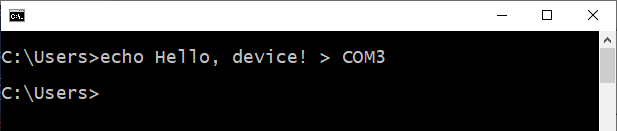
Q2: How do I send binary data or a file to a COM port from cmd.exe (command line)?
Use copy /b to send a binary file directly to the COM port. Example:
Configure the port:
mode COM3: BAUD=115200 PARITY=N DATA=8 STOP=1
Send a file (binary):
copy /b mydata.bin COM3
To send a text file without conversion, use copy /b as well. This method writes the file bytes exactly as-is. To append instead of overwrite, use type myfile >> COM3 only after confirming port behavior.
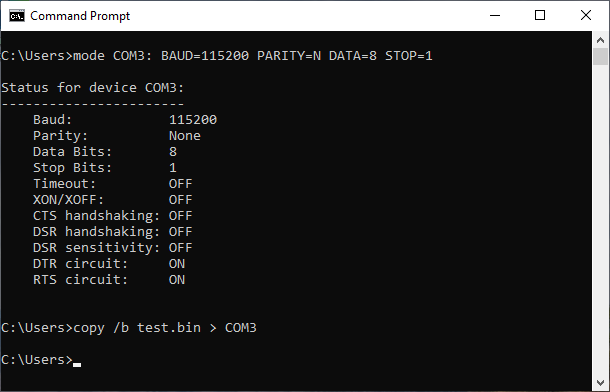
Q3: How can I send data to a serial port using PowerShell (better control, raw bytes, and scripting)?
PowerShell can use the .NET System.IO.Ports.SerialPort class for precise control. Example one-liners and small scripts:
Open, send text, close (one-liner):
powershell -NoProfile -Command "$p=New-Object System.IO.Ports.SerialPort 'COM1',9600,'None',8,one;$p.Open();$p.WriteLine('Hello from PowerShell');$p.Close()"
Send raw bytes from a hex array:
powershell -NoProfile -Command "$p=New-Object System.IO.Ports.SerialPort 'COM3',9600,'None',8,one;$p.Open();$buf=([byte[]] (0x02,0x10,0x03));$p.Write($buf,0,$buf.Length);$p.Close()"
Benefits: full control of baud, parity, and timeouts, and ability to read responses. Use scripts for complex sequences and error handling.
Q4: Use the specialized small utility for Windows to send a few bytes and characters.
The free RS232Switch utility allows you to configure a COM port and send a small HEX or ASCII command from a single command line. The main advantage is the launching speed, and it works on all Windows operating systems. This program was designed to control AV processors, switches, or projectors via an RS232 port. If you need to send several messages, you can call this utility from a batch file.
rs232switch.exe [/DEBUG] [/COM 1] [/MODE 9600,8N1] [/ASCII|HEX|HEX2] data_to_send
 /COM - port number (optional, default = 1)
 /MODE - COM port mode (optional, default = baud rate: 9600, data bits: 8, no parity, 1 stop bit)
 /DEBUG - enable debug messages (optional, default = off)
 /ASCII - ASCII characters only
 /HEX - Mixed ASCII and HEX data (default, e.g.: #01data#02)
 /HEX2 - 2-byte HEX data (e.g.: 01020304FF03)

Example: rs232switch /COM 3 /MODE 115200,8N1 #02hello#03
Q5: What if I need more features (hex send, logging, GUI)?
Use third-party tools like Serial Port Monitor. You can send files and data from a command line, and it also has a scripting interface for sending bytes, changing baud rates, and having interactive sessions. This method gives you more flexibility than simple redirection in a command line (e.g., manually configure end of line, hardware handshaking, control characters for software handshaking, define quick commands to send, HEX and ASCII screens, etc.).
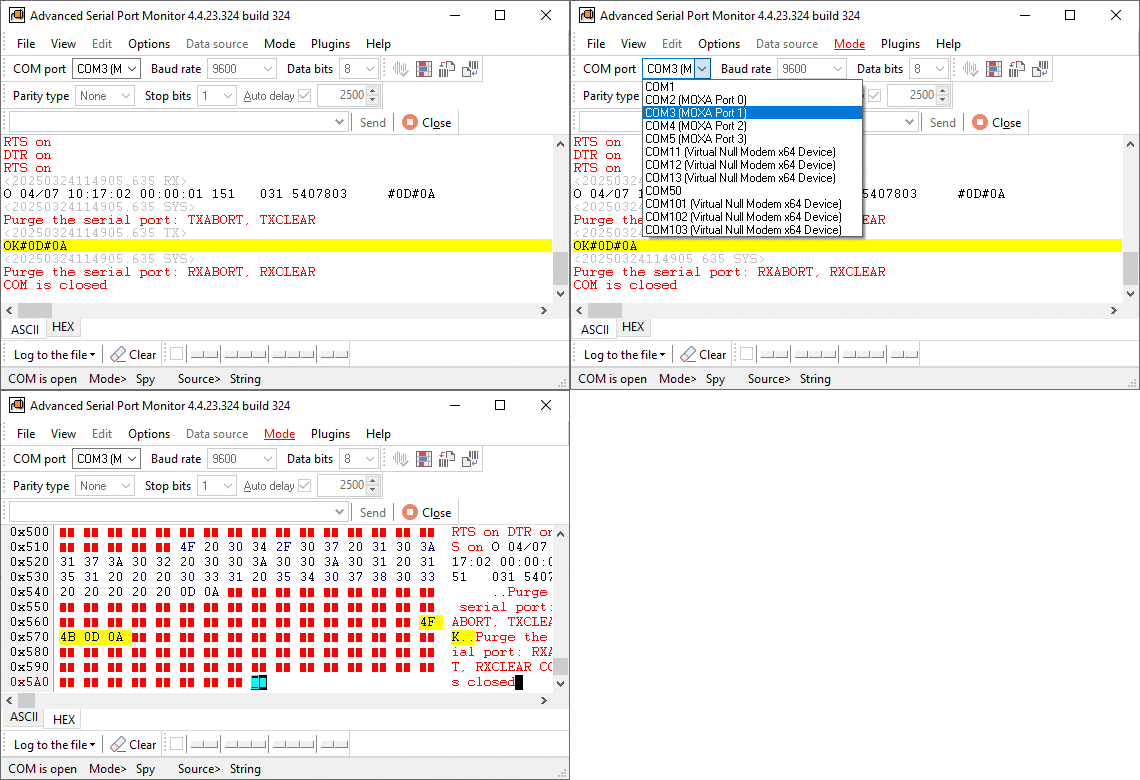
General tips and troubleshooting about sending data to a serial port
- Always configure the COM port communication parameters before sending (use mode or API-based methods).
- Close the port after sending to allow other applications access.
- Use elevated privileges if required by policy or device drivers.
- If binary data is required, avoid commands that perform text conversions (like plain echo without care).
- Check Device Manager or other methods for the assigned COM number if unsure.
Pick the method that matches your needs: simple text (echo/copy), precise programmatic control (PowerShell/.NET or Python), or advanced GUI/CLI tools with a user interface and a comprehensive set of options and features.
See also
COM Port Not Working in Windows
How to Test a COM Port in Windows
Garbled Serial Data on a COM Port: 7 Checks in Order
5 Ways To Send Data To COM Port From Command Line in Windows
How To Add COM Port Device On Windows Computer
6 Best Serial Port Monitor Tools (Guide & Comparison)
2 common reasons why applications failed to open serial port
Related topics: Advanced Serial Port Monitor
hereRS232 monitor RS232 analyzer COM Port Debug RS232 terminal Serial port sniffer Serial port spy UART monitor RS232 pinout and signals Data monitor cables.